Connect an AI engine
Use the AI subscriptions, API keys or local models you already have, and pick one per bot.
Murage doesn't come with its own AI account. Each bot thinks with an engine you connect. You can use a different engine for every bot, and mix subscriptions, keys and local models in one team.
There are three ways to give Murage something to think with. You only need one.
Option 1: an AI tool you already use
If you already use Claude Code, Codex, Hermes, Grok Build, Cursor, Google Antigravity, Kimi, Qwen, Droid, OpenCode or Pi on this computer, Murage finds it and uses your own sign-in. Your subscription and its limits stay exactly as they are.
- Install the tool from its maker and sign in once in a terminal.
- Open Settings → Engines. Each engine shows its status, for example "Detected · signed in" or "Detected · sign-in required".
- If an engine is installed somewhere Murage can't find, choose Set CLI… and pick its program file.
The welcome can do this for you too. See Your first 10 minutes.
Option 2: a model key
Fuigo, the engine that comes with Murage, works with a model key.
- Open Settings → Models.
- Choose Add connection and paste a key from Anthropic, OpenAI, OpenRouter, DeepSeek, Mistral, Groq or xAI.
- Murage checks the key and lists the models it opens.
Keys are encrypted by your operating system and never shown again. Or connect Flux Router, which is one key for 70+ models.
Option 3: a model on your own machine
Run a model locally with Ollama, LM Studio, llama.cpp, vLLM or EXO, then add it under Settings → Models → Local models. Model processing stays on your hardware. Web search, connected apps and hosted voice still use outside services. Small local models are slower and less capable than hosted ones.
Pick the engine and model for each bot
Open a bot, then Bot settings → Model. Choose the Engine, then the model. The choice is the default for new conversations; existing conversations keep the model they started with. You can also switch the model for one conversation from the model button at the top of the chat.
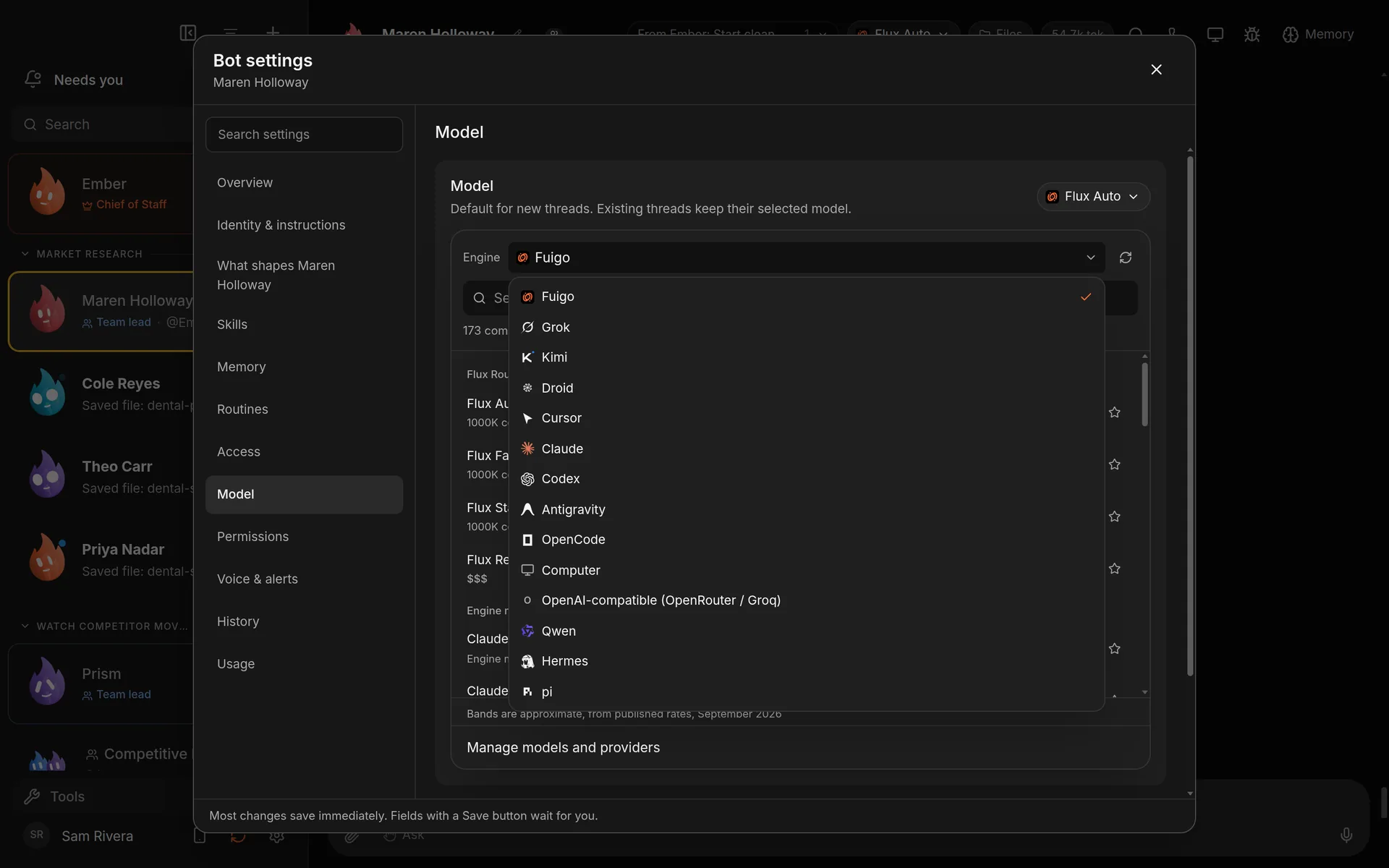
Every bot can use a different engine. Demo workspace. Your Chief of Staff starts as Ember; you can rename it.
Good to know
- Not every engine can do everything. Some can't hand work to other bots, use connected apps or control a computer. Murage tells you when a feature needs a different engine.
- A plain OpenAI-compatible endpoint can chat and write, but it can't use tools.
- Voice calls need Flux Router or your own voice keys. A Claude or ChatGPT subscription doesn't cover them. See Voice.
More detail in the Engines guide. Stuck? See Engine troubleshooting.