Memory
What your bots remember, the five kinds of memory, and how to see, correct and forget any of it.
Your bots remember what you tell them and what they learn along the way, and recall it in later conversations. All of it is stored on your computer, and you can open, correct, pin or forget any memory.
How remembering works
Out of the box, memory is set to Capture and recall: Murage captures your conversations and recalls what's relevant in later turns. You can switch to Capture only, or turn memory off, in the workspace memory settings.
Each bot also keeps its own notebook, a file called MEMORY.md. The notebook rides along on every turn and the bot updates it as it works. Routine and webhook runs read the notebook but don't change it.
The five kinds of memory
Murage sorts what it remembers into five kinds:
- Episodic: what happened. Excerpts of conversations and the sources behind them, like a diary.
- Working: where things stand right now. A snapshot of the work in progress.
- Procedural: how to do things. Ways of working a bot has picked up, and skills.
- Identity: who's who. Facts about you, and about who the bot is.
- Semantic: facts. Plain statements, such as "Acme only signs annual contracts".
Who can see a memory
A memory belongs to a place: one conversation, one bot, a channel, a team, a project, or the whole workspace. A bot only recalls memories from places it belongs to. People who message your bots through a channel, other than you, don't get your bots' private or team memory.
Open your memory
- The Memory button at the top of a chat opens that bot's memory beside the chat.
- Bot settings → Memory shows the same for one bot.
- Team map → Manage memory covers the whole workspace.
- Open workspace memory settings manages capture, imports and the optional local search model.
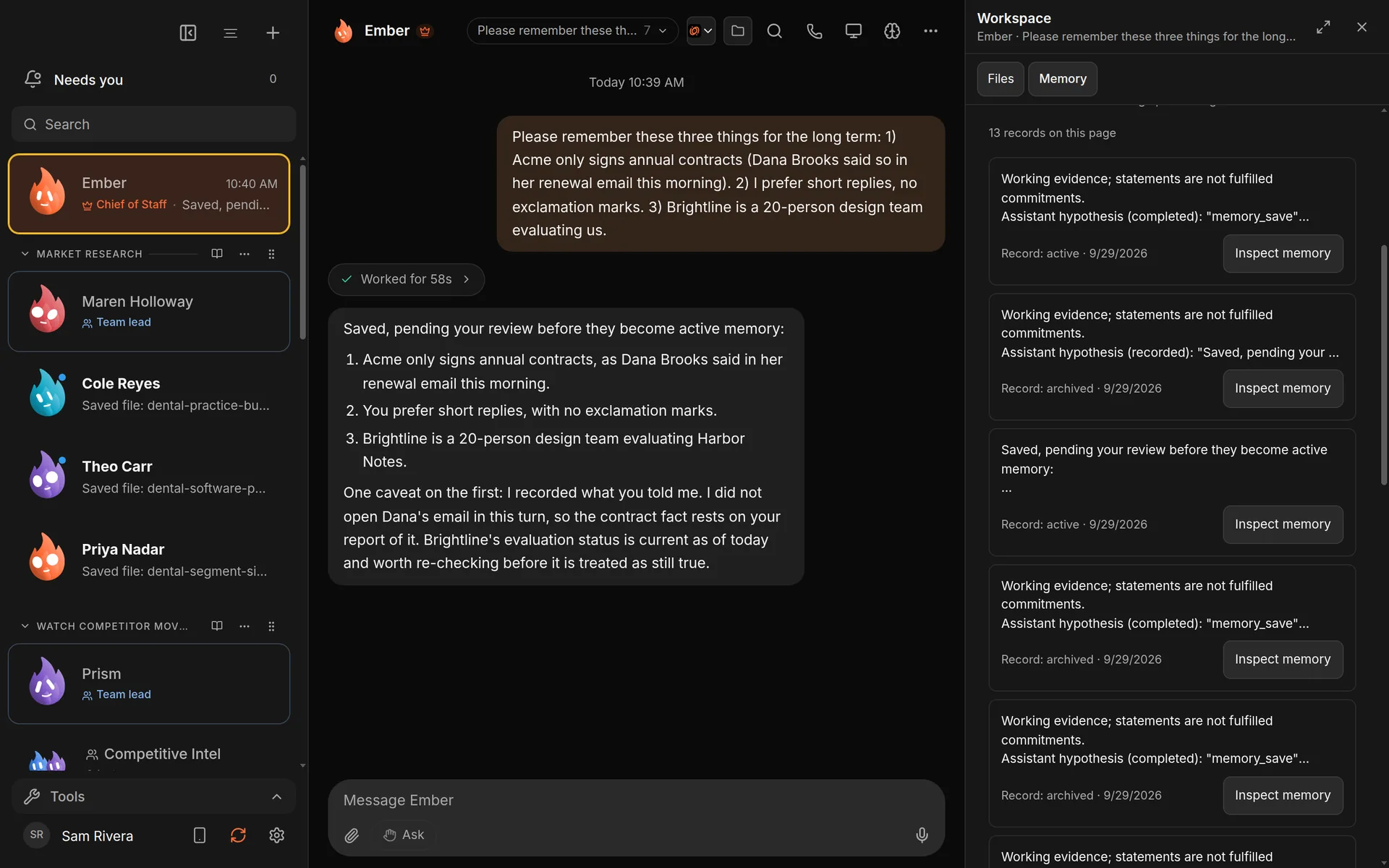
A chat with your Chief of Staff (it starts as Ember; you can rename it) and its Memory panel.
Correct, pin or forget
Choose Inspect memory on any record to see its text, its version and the sources it came from. From there you can:
- Save correction: fix it. The old version is kept.
- Pin memory: keep it at the front.
- Share memory: make an approved copy for another team, project or bot.
- Archive memory: stop using it, but keep its sources.
- Forget memory: remove it for good.
- Review as skill: ask a bot to turn a remembered way of working into a skill, which you still approve.
Forgetting removes a memory from Murage. Text that was already sent to a hosted AI provider can't be taken back from them.
Automatic learning
Murage can also distil facts and ways of working from captured conversations. The switches are Learn facts automatically and Learn procedures automatically. Turn on Review new learning before activation to hold new learning in Needs review until you approve it.
Automatic learning only starts once you pick a connection to do the distilling. Capture and recall work without one.
Good to know
- Memory lives in a database on your computer. It doesn't sync between computers.
- Smart (semantic) search needs a one-time local model download. Intel Macs use keyword search.
- You can import existing notebooks and notes into memory.
- Managing memory is done in the desktop app.