Memory health and learning
The Health card and its backlog, the Checking earlier memory strip and Hand back disk space after an update, a paused memory upgrade, tested recall improvements, the learning connection, the monthly learning limit and skill improvements a bot suggests.
The Health card
SettingsMemory has a Health section, with a disclosure called Workspace learning activity. It shows what happened across the whole workspace: how many sources were Captured and Processed, how many searches ran and what they found under Retrieved, and how many references were Supplied to turns. Under it is the processing backlog, written as a line like "4 queued · 1 processing · 0 deferred · 0 failed".
Two things to know when reading it. The counts cover the whole workspace even when you are looking at one bot. And a memory that was saved or retrieved was offered to the bot; the card cannot prove the bot used it in its answer.
You see
Search index is updating. Recent records may not appear yet.Do this
Memory is rebuilding its search index. Records you saved in the last few minutes show up when it finishes. Nothing to do.
You see
Memory is catching up and will try again shortlyDo this
The background worker fell behind. It retries by itself. If it says this for more than an hour, export diagnostics and see Troubleshooting memory.
After an update
Some updates change how memory is stored. Murage then does the work in two places: a screen before it opens, and a strip once it has. Don't quit and reopen Murage to hurry either of them along; quitting pauses the work, and it carries on from the same place next time.
You see
Updating your memoryDo this
The window shows how many messages and conversations it is working through and roughly how long is left. Keep Murage open. Nothing is removed; your conversations and memory stay as they are. Quit Murage pauses the work and it carries on the next time you open Murage.
You see
You can chat as usual. Checking earlier memory, 42%.Do this
Murage checks and tidies earlier memory in the background while you work. The strip shows the percentage and sometimes the phase: checking replies, checking links, putting earlier replies in order. Bots pick up their earlier replies again when it is done. Murage may feel a little slow meanwhile, and on a very large install the check can take a few hours.
You see
Murage made your memory smaller. You can hand back about 1.3 GB of disk space.Do this
The upgrade left old records it no longer needs. Choose Hand back disk space and let it run. It takes a few minutes, Murage may feel slow while it works, and it needs some disk space of its own to do it. If it says it needs more room, make some and choose Try again.
You see
Murage needs moreDo this
Make room for at least the amount it names, then open Murage again. Nothing has been changed.
You see
Your data was last opened by a newer version of MurageDo this
You went back to an older version after a newer one changed the memory format. Install the latest Murage from the download page and your data opens.
You see
Murage paused while updating your memory, or stopped at the time it allows for this stepDo this
Your conversations and memory are still there. Open Murage again and it carries on from the last step it finished. If it happens twice, the reason is in the log it names, and you can restore a backup instead.
Tested improvements
The Memory page has two optional checks, Enable tested recall improvements and Enable tested classification improvements. Each lets Murage try changes to how recall or sorting works, tested against synthetic examples that ship with the app. A change is applied only when held-out checks improve without regressions. Your private conversations are not used as training examples for these checks, and nothing runs until you turn a check on. They tune memory settings, not your bots, and your automatic learning choices and processing limits still apply.
Learning
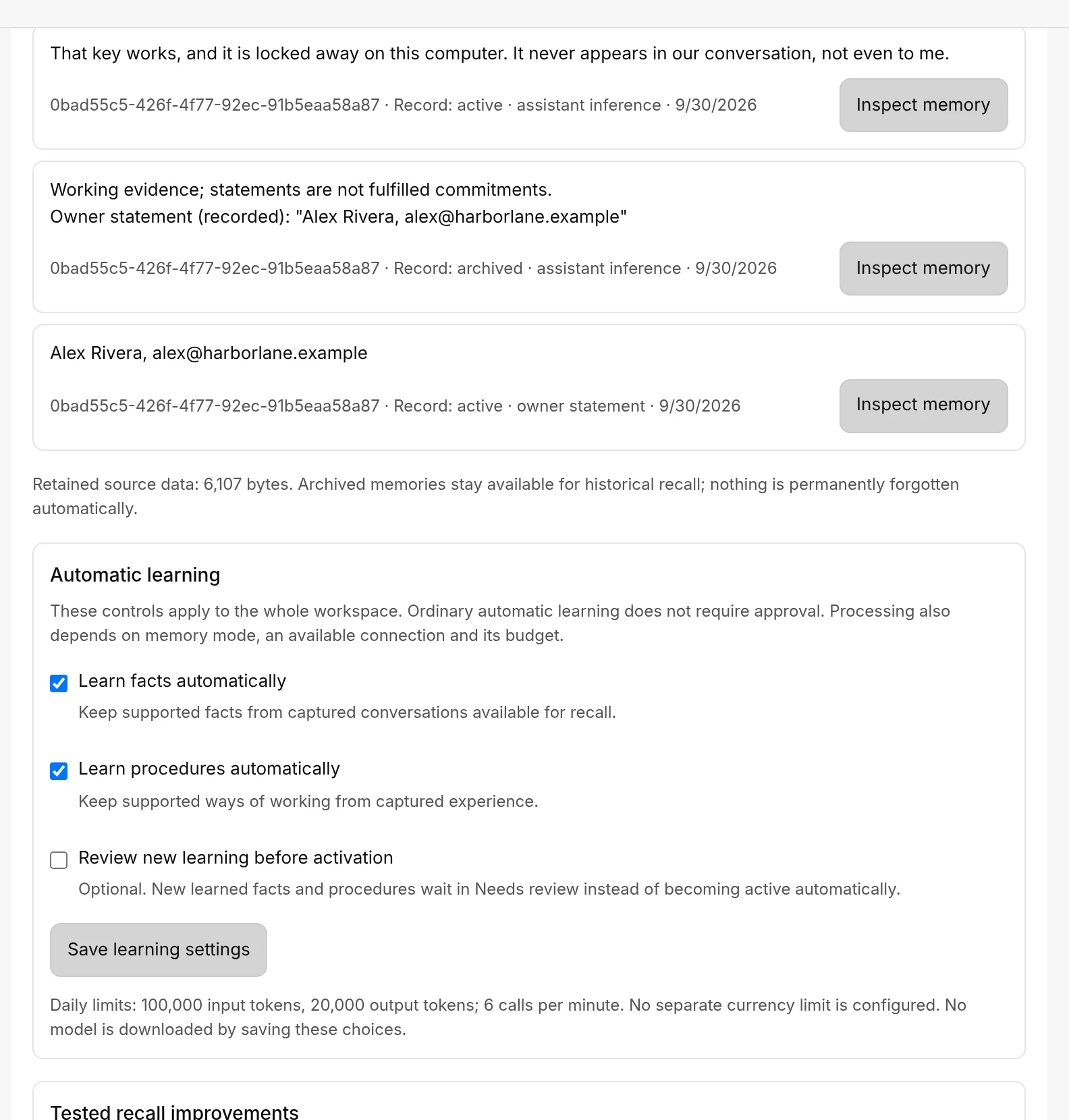
Capture and recall work on their own. Automatic learning, which pulls facts and ways of working out of captured conversations, only runs once you have chosen a connection for it.
You see
Learning isn't configuredDo this
Under Learning connection in SettingsMemory, choose an eligible connection, or leave learning off. Learning uses a separate text connection; your bot's chat engine is not used for it.
You see
New learning never appearsDo this
If Review new learning before activation is on, new learning waits in Needs review until you approve it. Check there.
You see
Learning paused for the rest of the monthDo this
It reached this month's learning limit. Your bots still answer and still remember what they already learned, and Murage keeps noting new chats so learning picks up where it left off. Choose Double the limit and resume, or Leave paused until next month.
Improvements a bot suggests
When learning is on, a bot can suggest an improvement to a skill or routine it uses. Open Bot settingsLearning and look under Suggestions. Each reads like "Improve the skill "Weekly report": …" with the change spelled out. Choose Apply, Edit or Not now. A change that sends or reaches other people always waits for you. Improvements Murage applied on its own are marked Improved automatically, and Undo puts back the earlier version.
The same page has Tell it something for a rule you want the bot to keep from now on. That is also where to put your customer rules for now: the switch Learn from customer and audience messages is shown with the note "Coming later. Nothing is learned from customer or audience messages yet." Today bots learn from your own feedback, edits and marks.
Reviewing individual memories, and the cards that ask before a memory is kept, are on Reviewing and correcting memory. How lessons from your corrections are shown and undone is on How bots learn from your corrections.