Real work, finished…By an AI team you never had to hire.
Tell your AI Chief of Staff the job. It builds a team, runs it on the AI plan you already pay for, and brings the finished work back.
Put a team on it.
No account needed · Runs on the AI plan you already pay for
Put a team on your inbox.
Reply Desk
Support and sales inbox
Go through my inbox before I get in. Draft replies in my voice. Send nothing.
Ember put Reply Desk on it
- SupportSupport
- CopyCopy
- SalesSales
Support
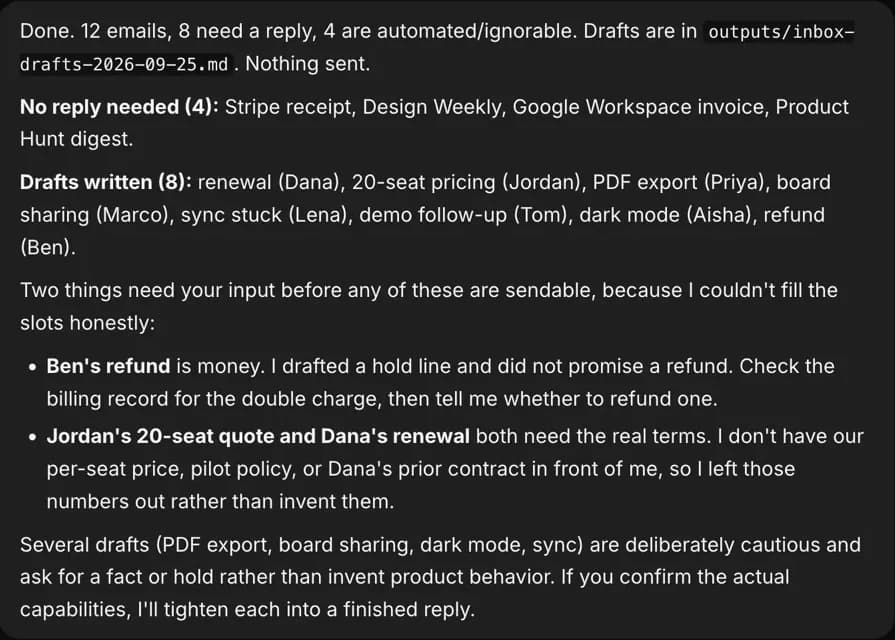
12 new since last night. 4 are receipts and newsletters, set aside. I drafted replies to 8 from your help docs.
Sales
One is a 20-seat team asking about pricing. That draft needs your per-seat price first.
Waiting on you
Copy: Two drafts need a fact from you: the per-seat price, and Dana’s prior contract terms.
The conversations are examples. The app is real.

Runs on the AI you already pay for.
Murage adds nothing to your bill. Keep your plan; your AI provider bills you as usual.









Also Google Antigravity, Droid, Pi and any OpenAI-compatible API (chat only).
Mix them on one team, and change a bot’s engine without losing its memory or its job.
Plus Gmail, Calendar, Slack and 1,600+ more apps.
Sign in to each app once, through Flux Router credits or your own connected-apps key.
 Gmail
Gmail Google Calendar
 Slack
Slack Notion
 HubSpot
 Shopify
 Stripe
 Google Drive
 WhatsApp Business
 Linear
 Calendly
 QuickBooks
 Zoom
Zoom Asana
Asana
 Outlook
 Google Sheets
 Salesforce
 Canva
Canva Figma
Figma Airtable
 Mailchimp
 Microsoft Teams
 GitHub
 Dropbox
 Intercom
 Xero
Xero Trello
 LinkedIn
 Google Docs
Claude, Claude Code, Codex, Hermes, Grok, Cursor, Kimi, Qwen, OpenCode, Ollama, Gmail, Google Calendar, Slack and the other product names and logos on this page are trademarks of their respective owners. Murage is not affiliated with or endorsed by them; the names and logos are used only to identify the apps and engines Murage works with.
Meet your team.
You talk to Ember. She hands the work to specialists who each know one job, then brings it back to you.

Build the team you want. Pick a character or a face for every bot, give each one a job, a personality and a voice, rename anything, or start from one of 79 ready-made teams.
Founder SetupLed by Patch
 PatchOps
 MiraBrand
 CoinNumbers
 SentryCounsel
GrowthLed by Beacon
 BeaconChannels
 ScoutResearch
 QuillCopy
 LensAnalyst
 VerdictQuality Gate
Customer DeskLed by Mend
 MendSupport
 RioSales
An example team. Characters are the app’s own; faces made with Murage’s own avatar generator. They’re bots, not customers.
Here’s what came back this morning.
Three real runs, each with what it left for a person to decide.
8replies drafted from 12 emails
4 set aside. 2 questions only you can answer. Nothing sent.
Clear the inbox before I get in
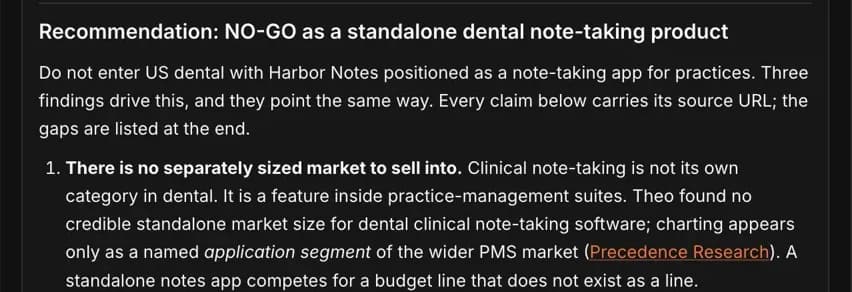
4bots on one market question
Proposed before anyone started. One page back, with a source on every claim.
Should we sell to dental practices?
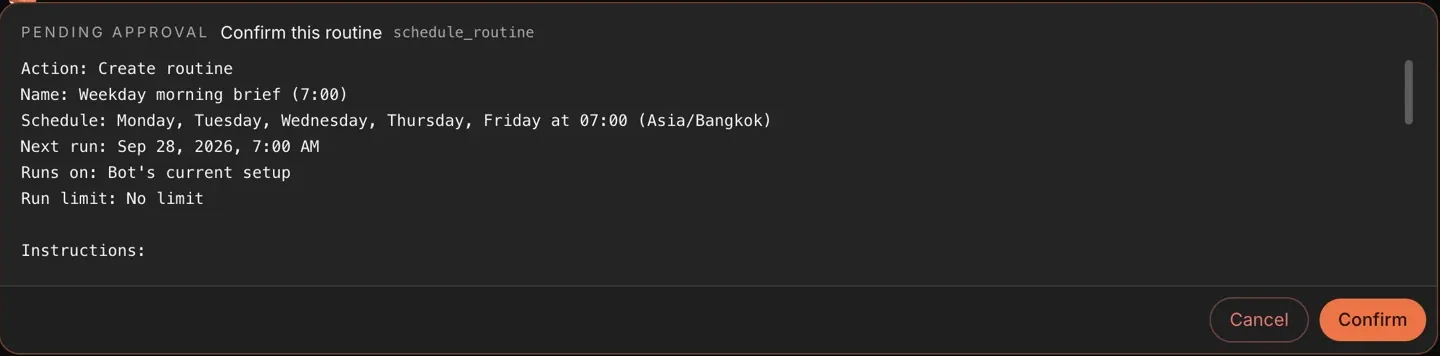
7:00a brief every weekday
Nothing was scheduled until the owner pressed Confirm.
A one-page brief every weekday at 7
Recorded in a demo workspace. The company and its emails are made up; the app and what the bots did are real.
They do the work. You make the calls.
New bots start on Ask. On Full access, a bot stops before messaging anyone new, posting publicly, paying, or deleting outside its folder, unless you have allowed it for that task.
- They read, sort, research and draft on their own.
- You answer from your computer or your phone.
- Give a trusted bot more room later, one bot at a time.
How approvals workRead the approval code
Replies in an existing conversation go ahead on Auto and Full access. No limits turns the stop line off for your own chats; routines still stop at it. On Hermes and other ACP engines, Ask and the stop line cover only what the engine asks Murage about, which for Hermes is shell commands and file edits. An OpenClaw bot runs under OpenClaw’s own approval settings: it handles its command approvals itself and doesn’t ask Murage first.
CopyReply Desk
To: jordan@brightline.example
Harbor Notes for Brightline
Held at the stop line
Waiting on you
Message someone it has not written to before: jordan@brightline.example
What you pay, and who you pay.
Pricing in detail- The appOpen source
- Open source under AGPL-3.0. No seats, no trial clock, no account to start.
- The AIAny AI
- Fuigo (built in), Claude Code, Codex, Hermes, a local model or any API key. Your provider bills you as usual.
- Flux RouterOptional
- Recommended. One account unlocks 1,600+ apps, voice calls, images and live search. Or bring your own keys.
Before you download.
More questionsWhat do I pay for?
The app is open source under AGPL-3.0. You pay your AI provider for model usage, as you would anywhere. Connected apps like Gmail use Flux Router credits or your own connected-apps key, and voice calls use Flux credits or your own voice keys.
What if I don’t pay for Claude or ChatGPT?
You have three other ways in. Run a local model on your own computer (slower and less capable than hosted models), add an API key from a provider such as Anthropic, OpenAI or OpenRouter, or use Flux Router credits.
Do I need to be technical?
No. You talk to your Chief of Staff in plain words. The one technical moment is installing an engine like Claude Code: Murage opens a one-line command for you to paste, and you sign in once. That install uses npm, so it needs Node.js; the built-in Fuigo engine needs only a key.
Where does my data go?
Your conversations, files and memory are stored in Murage’s folder on your computer, not on our servers. The AI, apps and services you connect receive what they need for the jobs you give them, and you choose each one.
- Ember, Chief of Staff
- Patch, Ops
- Mira, Brand
- Coin, Numbers
- Sentry, Counsel
- Beacon, Channels
- Scout, Research
- Quill, Copy
- Lens, Analyst
- Verdict, Quality Gate
- Mend, Support
- Rio, Sales
Give your first job to Murage.
Download the app, connect the AI you already pay for, and tell Ember what needs doing.
No account needed · Runs on the AI plan you already pay for