"Which AI should we use?" is usually asked as a company decision. Somebody picks Claude or ChatGPT, everyone gets a seat, and the whole business lives with that choice, including the jobs it is not very good at.
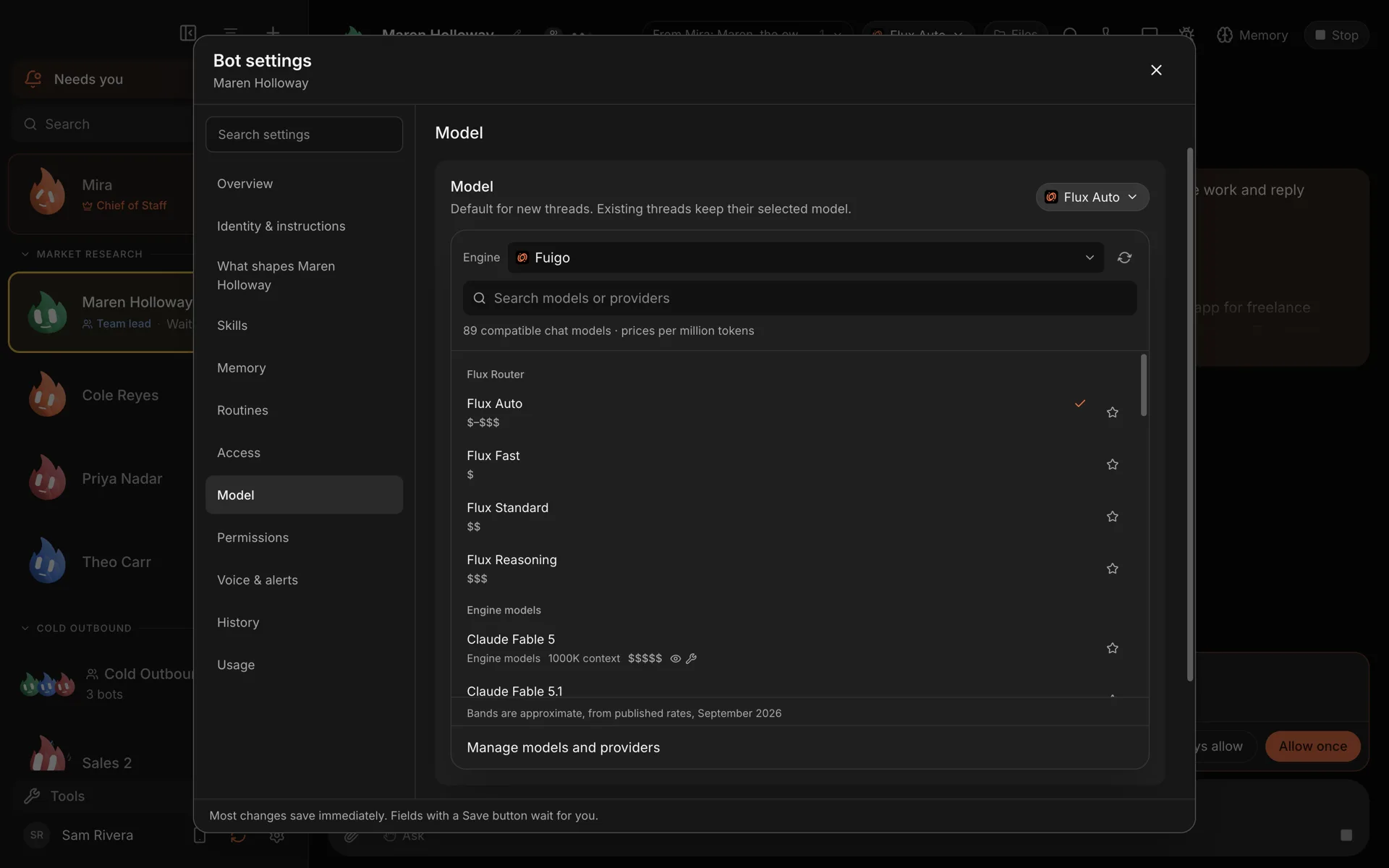
There is a better unit of choice than the company: the job. A bot that writes customer emails, a bot that reviews code and a bot that tags a thousand support tickets do not need the same brain. In Murage, each bot picks its own engine, so you can match the engine to the work.
What an engine is
An engine is the program that does a bot's thinking and uses its tools. Murage starts it on your computer and shows its work in the chat. Engines come in a few kinds:
- Agent engines you may already use: Claude Code, Codex, Hermes, Grok Build, Cursor, Google Antigravity, Kimi, Qwen, Droid, OpenCode and Pi. Each one uses your own sign-in. OpenClaw is coming.
- Fuigo, the engine bundled with Murage. It thinks with a model key, a local model or Flux Router.
- Local models through Ollama, LM Studio, llama.cpp, vLLM or EXO.
- Provider keys for Anthropic, OpenAI, OpenRouter, DeepSeek, Mistral, Groq and xAI.
- Flux Router, one optional account for 70+ models.
You set the engine in Bot settings → Model. The choice becomes the default for that bot's new conversations. Its memory, instructions and skills stay the same when you switch.
The three big agent engines
Claude Code is Anthropic's agent, on your Claude plan. It is strong at long, careful work across many files, and it writes well. It is a natural fit for a builder bot, a document-heavy research lead, or a Chief of Staff.
Codex is OpenAI's agent. In Murage it means the official Codex CLI you install and sign in to yourself, on your ChatGPT plan or an OpenAI key. It is quick and practical on code, and its own commands, like /review, work from the Murage message box.
Hermes is the open-source agent from Nous Research, under the MIT license. People who like it tend to like its memory and its way of building skills. Murage runs it through its ACP adapter, so a Hermes bot can sit on a team next to Claude Code and Codex bots.
These are all real, separate products, made by other companies. Murage works with them. It is not made by or affiliated with Anthropic, OpenAI or Nous Research.
How to pick, bot by bot
A few rules of thumb that hold up in practice:
- Your Chief of Staff gets your most capable engine. It plans, briefs and judges the work. It also has to hand work to other bots, so it needs an engine that can. Claude Code, Codex, Fuigo and most tool-using engines can. A plain chat-only endpoint cannot.
- Builders get a coding agent. Claude Code or Codex, working in the bot's folder.
- Reviewers get a different model from the builder. A second opinion from a different family catches different mistakes. A reviewer is optional, and you can put one on any team.
- Writers get the model whose tone you like. Try two for a week and keep the one you edit less.
- High-volume, low-stakes bots get a small local model. Sorting, tagging and first-pass triage run all day on your own machine and cost nothing per call.
- Sensitive work gets a local model. When the text should not leave your computer, a local model keeps it there.
An example team
Say you run a small software business and want a weekly product update written and checked.
- Chief of Staff on Claude Code: plans the week's work and reports to you.
- Builder on Codex: reads what shipped in the repository.
- Writer on Claude Code: drafts the update for customers.
- Reviewer on Hermes: checks the draft against what actually shipped.
- Tagger on a local model through Ollama: sorts last week's support tickets by topic.
You ask the Chief for "this week's customer update, checked against what shipped, with the three biggest support themes". It hands out the parts. Each bot works on its own engine, and one answer comes back to you.
What stays the same across engines
The point of picking per bot is that the rest does not change when you do.
- Memory belongs to Murage, on your computer. Switch a bot from Codex to Claude Code and it still knows what it knew.
- One approval system. New bots start on Ask. On Full access, a bot stops before messaging anyone new, posting publicly, paying, or deleting outside its folder, unless you have allowed it for that task. On Claude Code and Codex, the stop line also covers tools from MCP servers you add. On Hermes and other ACP engines, Ask and the stop line cover only what the engine asks Murage about: Hermes asks before shell commands and file edits, but not before MCP or connected-app tools. See approvals and the stop line.
- House Rules are read by every bot first, on every engine.
- Routines and the inbox work the same for every bot.
What still depends on the engine
Being honest about the edges saves time.
- Quality. A stronger model does better work. If a bot's output is weak, try a better engine before anything else.
- Tools. Agent engines and Fuigo can use Murage's tools, hand work to other bots and act in connected apps. A plain OpenAI-compatible endpoint can chat and write, but cannot use tools. Murage tells you when a feature needs a different engine.
- Cost. Subscription engines count against that plan. Keys are billed by the provider. Local models cost only your electricity. Murage adds no mark-up.
- Setup. Each agent engine installs through a one-line command Murage opens for you, and you sign in once on its maker's own screen.
Start with what you have
You do not need all of this on day one. The welcome looks at your computer and connects the engines you already use. Start with one, put the Chief on your best one, and add a second engine the first time a job clearly suits it.
The full list is on the engines page, and the setup steps are in Connect an AI engine. If you are weighing one engine's own app against Murage, see Murage vs Codex and Murage vs Hermes.
Download Murage and put the right brain on each job.