A question we get a lot: "I already use Claude Code. Why would I want Murage?" Or the same question about Codex, or Hermes, or a local model.
The short answer is that Murage does not compete with them. It uses them. Each bot in Murage runs on an engine, and that engine can be the agent you already have. Murage is the layer on top: it turns one agent in one window into a team that remembers, runs on a schedule, reports to one place and asks before it acts.
Engines and the layer above them
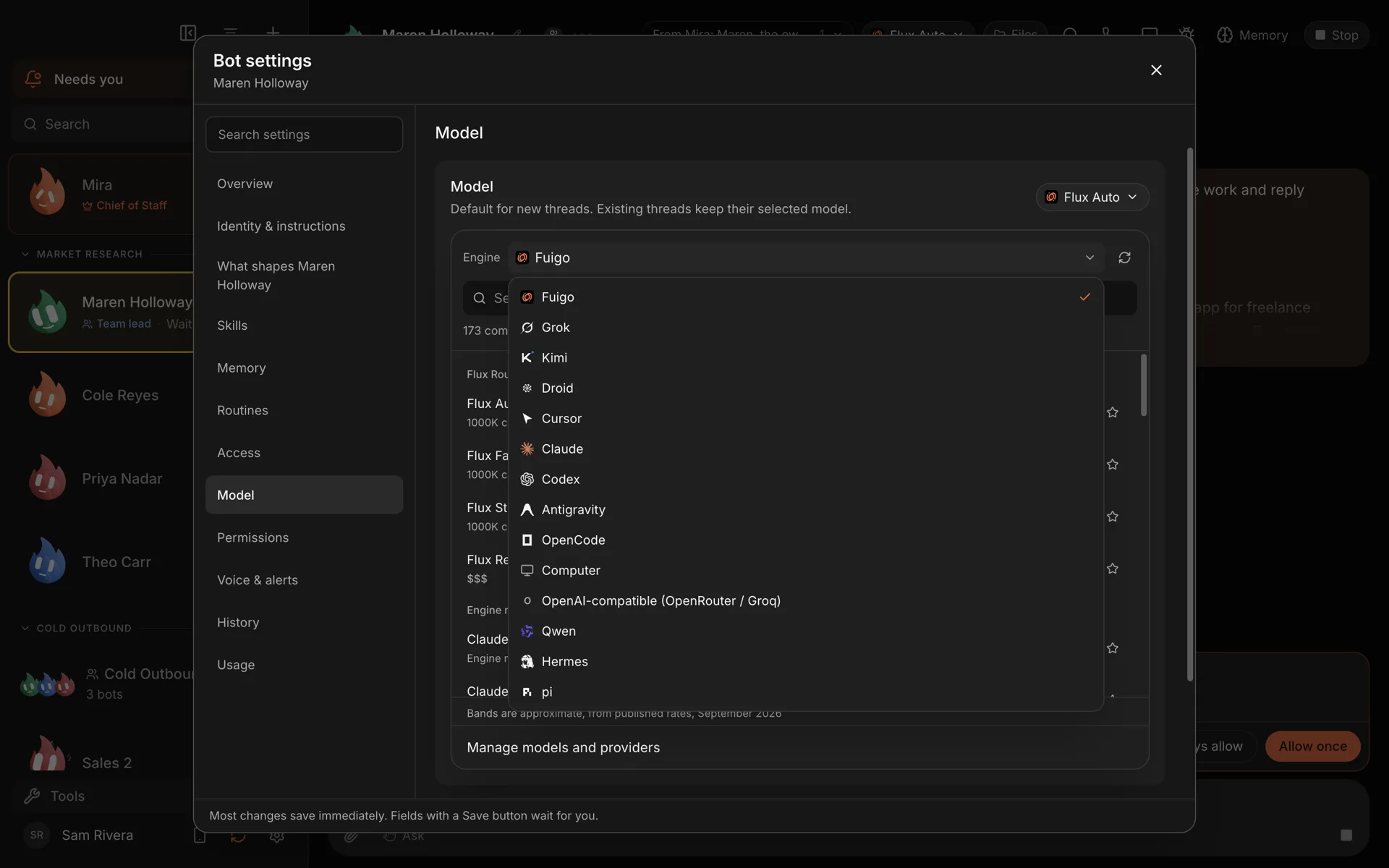
Think of an engine as the brain a bot uses to think and use tools. Murage works with a wide range of them, and you choose per bot:
- Agent engines you may already use: Claude Code, Codex, Hermes, Grok Build, Cursor, Google Antigravity, Kimi, Qwen, Droid, OpenCode and Pi. OpenClaw is coming.
- Fuigo, the engine bundled with Murage, which needs a model from Flux Router or a provider key.
- Local models through Ollama, LM Studio or llama.cpp, so the thinking stays on your machine.
- Provider keys for Anthropic, OpenAI, OpenRouter, DeepSeek, Mistral, Groq and xAI.
- Flux Router, one optional account that covers 70+ models behind four simple choices: Auto, Reasoning, Standard and Fast.
When you first open Murage, the welcome checks which of these you are already signed in to, so you can start with what you have.
Use the subscription you already pay for
If you pay for Claude and use Claude Code, a Murage bot can use your Claude Code sign-in as its engine. The same goes for Codex with your ChatGPT plan. If the tool isn't installed yet, Murage opens a one-line install command for you to paste. Then you sign in the normal way, with the company that makes it, and the usage counts against your plan with them, exactly as it would if you were typing into the terminal yourself.
That means you do not have to buy a second AI subscription to get a team. You put the one you have to more use.
A quick note on names: Claude Code, Codex and Hermes are products of Anthropic, OpenAI and Nous Research. Murage works with them. It is not made by, affiliated with or endorsed by any of them.
Mix engines in one team
Because the engine is set per bot, a single team can use several. A few patterns that work well:
- A coding bot on Codex or Claude Code, where their tools shine.
- A writing bot on the model whose tone you like best.
- A sorting or tagging bot on a small local model, because it runs all day and costs nothing per call.
- A Hermes bot for people who already like how Hermes works and want it on a team with the others.
You can switch a bot's engine or model later without rebuilding it. Its memory, instructions and job stay the same.
What Murage adds on top
A good agent in a terminal is excellent inside its own session. Murage adds what lives outside any one session: a standing team, its memory, its schedule and one place for approvals.
A Chief of Staff. You talk to one bot, and it builds and briefs the specialists, whichever engines they run on. We explained that in what an AI Chief of Staff actually does.
Shared memory across engines. Memory belongs to Murage, not to the engine. What your team has saved about your business is recalled into whichever engine a bot uses, and stays on your computer. Change a bot's engine and its notes stay put.
One place for approvals. Every bot, on every engine, asks through the same system. New bots start in Ask mode, and the questions from all of them land in one inbox. You do not have to learn each tool's permission settings. On Full access, the stop line judges those asks. On Claude Code and Codex, the stop line also covers tools from MCP servers you add. On Hermes and other ACP engines, Ask and the stop line cover only what the engine asks Murage about: Hermes asks before shell commands and file edits, but not before MCP or connected-app tools.
Schedules. A routine runs a job on a timetable, every weekday at 7 or every Monday, and leaves a record of each run. Your coding agent can review yesterday's merged work every morning without you opening a terminal.
Projects and teams. Put several bots on one goal with their own files and chat, or start from one of 68 ready-made teams in the team library.
Reach from your phone. Message your Chief of Staff from Telegram, or open the workspace in your phone's browser.
Where the engine still matters
The layer above does not make a weak model strong. A few honest points:
- Quality depends on the engine. A capable engine makes a better Chief and a better specialist. If a bot's work is poor, try a stronger model before anything else.
- Tool use depends on the engine. Agent engines and Fuigo can use Murage's tools, hand work to other bots and act in connected apps. A plain OpenAI-compatible endpoint can chat but cannot use tools.
- Costs are set by the provider. Usage on your own keys is billed by that provider. Usage on a subscription counts against that plan. Flux Router is billed in credits. Murage itself is free and adds no mark-up.
- Each tool's own terms still apply. Using Claude Code or Codex through Murage is still using Claude Code or Codex, under Anthropic's or OpenAI's terms.
How it compares
If you are weighing Murage against an agent product rather than an engine, we have written side-by-side pages: Murage vs Claude Cowork, Murage vs ChatGPT Work and Murage vs OpenClaw. The common thread is the same one in this post: Murage lets you keep the AI you prefer and adds the team around it.
The full list of engines, models and apps is on the engines and apps page, and the details of engine choice are on the engines page.
If you already have Claude Code, Codex or Hermes set up, you are most of the way there. Download Murage, let the welcome find your engines, and give your Chief of Staff a job.