If you pay for Claude, you probably already have Claude Code. It is Anthropic's coding agent, and it is very good: it reads a whole project, plans, edits files, runs commands and checks its own work. Plenty of people now use it for jobs that have nothing to do with code, like cleaning up a spreadsheet or drafting a proposal from a folder of notes.
So a fair question comes up: if I have Claude Code, what is Murage for?
The honest answer is that they sit at different levels. Claude Code is an agent. Murage is the layer that runs agents as a team. Murage can run the real Claude Code, signed in with your own Claude account, as one of your bots. You do not have to pick one.
What Claude Code does well
Claude Code is built for developers first. It runs in the terminal, in code editors, in Anthropic's desktop app, on the web and on your phone. It has subagents and "agent teams" for splitting up work, a memory file per project, and a growing list of connectors. Anthropic also offers scheduled cloud routines as a research preview.
If you are a developer who lives in a terminal and wants one excellent agent working on one codebase, Claude Code on its own is a strong choice. Nothing in this post argues otherwise.
When you want a standing team on more than one engine
The limits show up when the work stops being one task in one folder and starts looking like running a business.
- A team that outlasts the session. Claude Code can delegate to subagents and coordinate agent teams, and they're excellent inside a coding session. Murage adds a standing team outside any one session, with bots on different engines and one place for their routines, memory and approvals.
- More than one engine. If a job suits Codex, Hermes or a local model better, that is a different tool and a different window.
- Approvals are per tool. Each agent has its own permission settings, and you learn each one.
- Your staff are not in a terminal. The person who runs your support inbox will not open one.
None of this makes Claude Code worse. It is simply a different job.
What Murage adds around it
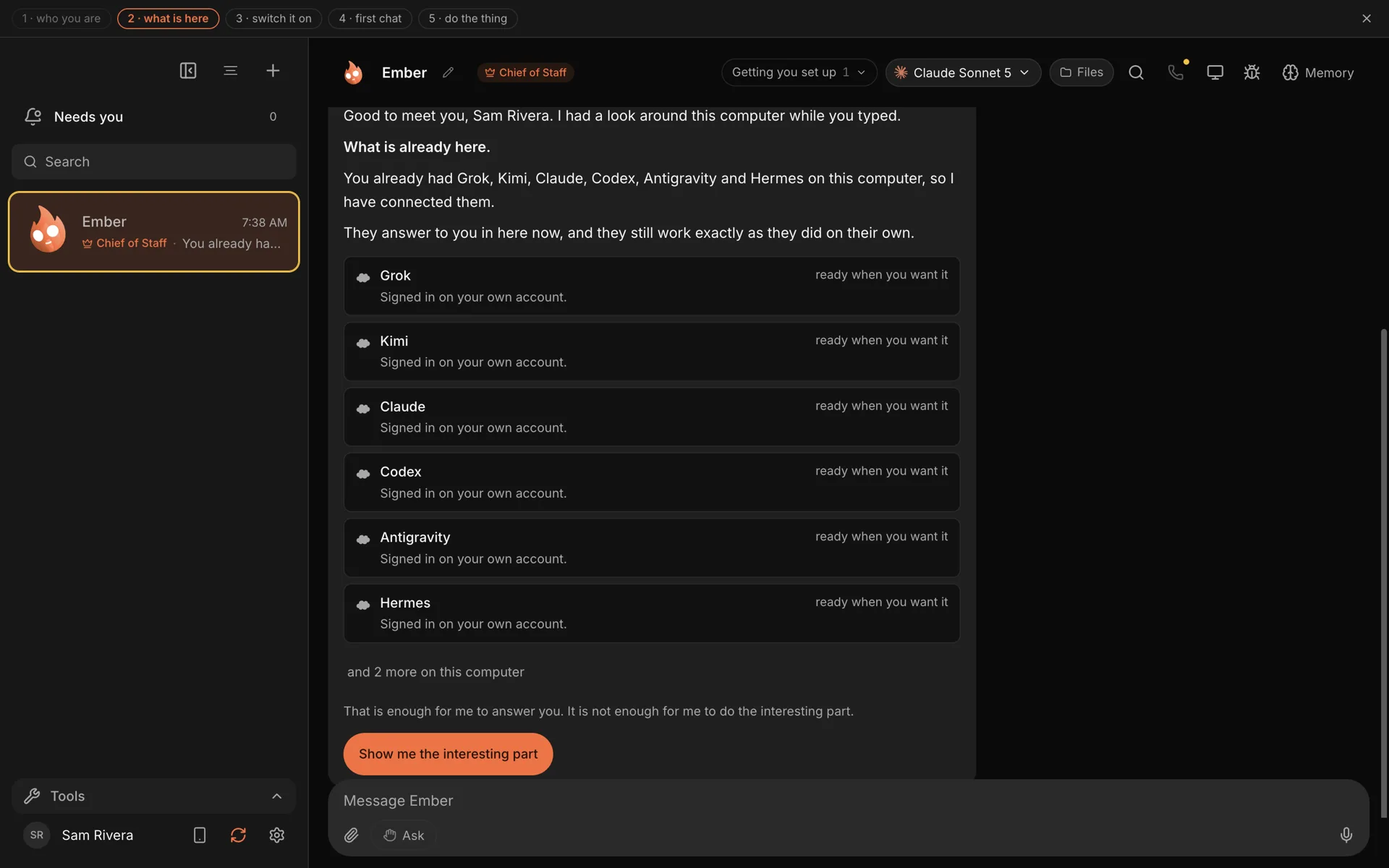
Murage is a free, open-source desktop app for Mac, Windows and Ubuntu. You talk to one bot, your Chief of Staff, and it builds and briefs a team of bots for you. Each bot runs on an engine you pick, and Claude Code is one of the engines.
Here is what sits around the engine:
A Chief of Staff. You describe the outcome. It works out the parts, proposes a team, waits for your go, and brings the results back into one thread.
Your choice of engine, per bot. A bot can run on Claude Code, Codex, Hermes, the bundled Fuigo engine, a provider key or a local model. One team can mix them. See engines.
Memory you can open. Memory belongs to Murage, on your computer, so it survives a change of engine. You can read it, correct it and make a bot forget. See memory.
Routines. A bot can run a job every weekday at 7 or every Monday, and leave a record of each run. They run on your computer while it is on.
One place for approvals. New bots start on Ask. On Full access, a bot stops before messaging anyone new, posting publicly, paying, or deleting outside its folder, unless you have allowed it for that task. On Hermes and other ACP engines, Ask and the stop line cover only what the engine asks Murage about: shell commands and file edits. The only level without that line is No limits, which you have to switch on at the desktop. See approvals and the stop line.
Reach. Message your Chief from Telegram, Slack or Discord and it replies there. Approvals come to you on Telegram with a tap.
How the two work together
When Murage starts, the welcome checks which engines are already on your computer. If Claude Code is installed and signed in, it shows up as ready. If it is not installed, Murage opens the one-line install command for you, and you sign in through Anthropic's own screen. Your subscription and its limits stay exactly as they are, because it is still Claude Code doing the work.
From there, you can put Claude Code on the bots where it shines. A typical small team might look like this:
- A builder bot on Claude Code, working in your project folder.
- A reviewer bot on a different engine, so a second model checks the first one's work. A reviewer is optional, and you can put one on any team.
- A writer bot on whichever model you like the tone of.
- A sorting bot on a local model that runs all day for nothing.
You ask the Chief for the outcome. It hands the parts out and reports back.
A quick way to decide
Use Claude Code on its own when:
- You are a developer and the work is code.
- You want one agent, in your editor or terminal, and you are happy managing it.
Use Murage, with Claude Code inside it, when:
- The work spans research, writing, email, numbers and code.
- You want to describe outcomes and have the work split up for you.
- You want to mix Claude with other engines, or keep some work on a local model.
- You want schedules, one approval inbox, and bots you can hand to staff.
The costs
Murage is $0, with no paid tier of the desktop app. Claude Code usage counts against your own Claude plan, exactly as it would in a terminal. Anthropic's current plans that include it start at Pro, $20 a month, as of September 2026. Some features in Murage, like voice calls and connected apps such as Gmail, need a Flux Router account or your own keys. A Claude subscription does not cover those.
Try it
If Claude Code is already on your computer, you are most of the way there. Download Murage, let the welcome find it, and give your Chief one job that is bigger than a single prompt. The side-by-side detail is on the Murage vs Claude Code page.
Claude and Claude Code are trademarks of Anthropic. Murage is not affiliated with or endorsed by Anthropic.