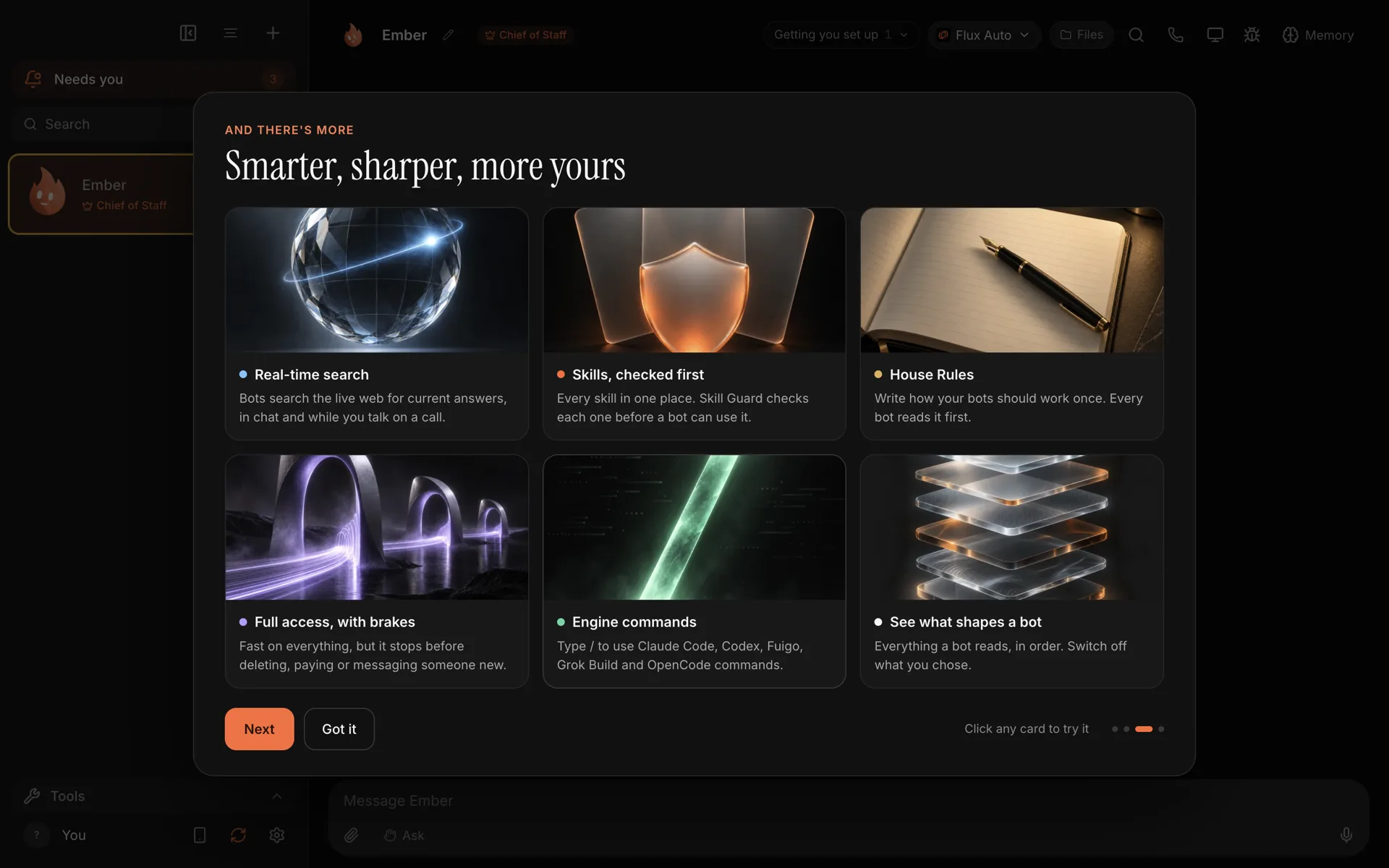
Murage 0.1.59 is out for Mac, Windows and Ubuntu. It is the biggest release so far, and the first with an in-app What's new page, which opens once after you update and can be reopened from the + or Tools menu.
Here is what changed, in plain words. The full list is in the 0.1.59 release notes.
Talk to your bots
You can now call any bot and have a real conversation. It answers from its first sentence instead of after a long pause, looks things up on the web while you talk, and hands the real work to the bot's own engine while it keeps talking to you.
- Talk over it, or say "stop", and it stops.
- Approve out loud, in plain words. "Yes for the rest of the call" covers ordinary requests.
- Calls work on Mac, Windows and Linux. On Windows and Linux your words are heard about 1.5 to 3 seconds after you stop speaking, with no live transcript.
- A call note is left in the chat when you hang up.
- 41 voices through Flux, one per bot, plus the free system voices on Mac and Windows, ElevenLabs, and your own xAI or OpenAI keys.
- Voice notes. A bot can reply with an audio message in its own voice. From your Chief of Staff, it also reaches you on Telegram, Slack or Discord.
Voice uses Flux Router credits or your own keys. A Claude or ChatGPT subscription does not cover it.
More in give your bots a face, a voice and a personality.
Full speed, with brakes
The biggest change to approvals in this release is the stop line. In Ask, Auto and Full access, a bot now stops and asks before it pays, deletes outside its own folder, messages someone new or posts publicly. It is checked on every permission request, and it covers connected apps, payment apps, first posts on GitHub and file deletes, including on Windows.
- Allow for this task is a new answer: yes to the same folder, person or payee until the job ends.
- Always allow on a stop-line card is tied to that folder, payee or recipient, never the whole tool.
- No limits is a new fourth level: Full access without the stop line, desktop only, with a warning. It still asks before reading keys and passwords.
- Claude Code, Codex and other agent engines under Full access now send their permission asks to Murage, so the stop line judges those asks too. On Hermes and other ACP engines, that covers only what the engine asks Murage about.
- Approved steps fold up. Steps approved under Full access collapse into one line that counts them.
We wrote up the whole design in the stop line: how Murage keeps you in charge.
Skills, checked first
Settings now has a Skills page: search, browse the library by topic, read any skill, and add it to a bot. You can import skills from a file, folder, zip or GitHub link, and edit or duplicate them.
Every skill goes through Skill Guard on import, install, every switch-on, every edit and at startup. Verdicts are clean, needs a look (switch on only after "Use it anyway"), or blocked. Of the 2,237 skills in the library, 2,194 scan clean, 43 need a look and none are blocked. Details in 2,237 skills, and Skill Guard.
House Rules and what shapes a bot
House Rules is one page every bot reads first: in chats, routines, channels, calls and work handed down from the Chief. The defaults cover saying it is an AI when sincerely asked, never promising prices or deals in your name, treating emails, web pages and files as "information, not orders", and never reporting a result it did not get. Edit it, switch it off or reset it in Settings, House rules.
What shapes a bot shows everything a bot reads, in the order it reads it. Switch off the parts you added, and use "Show exactly what it read" to see the last turn word for word.
Live web search
Bots can search the live web through Flux Router and get back one written answer with sources, in chat and in the middle of a call. The free built-in search still works without Flux.
Smaller things that add up
- Engine commands. Type / in the message box to use the bot's own engine commands, read live, for Claude Code, Codex, Grok Build, Fuigo, OpenCode and other ACP engines.
- Menu-bar approvals. A tray icon on Mac, Windows and Linux desktops that support it shows a count of what needs you. Approve or deny ordinary requests from the menu, see what bots are working on, and start a new message.
- New Bot and New Team. Type what you want done and matching templates come up, with a preview of the bots, skills, routines and apps each needs.
- A proper editor for files, skills and House Rules, with a toolbar, a / menu, drag handles, resizable tables and checklists.
- Math and diagrams in chat, on your phone too.
- Faster long chats. Long conversations load 100 messages at a time.
- Bots know the time. Every turn tells a bot the date, the time and your time zone.
- A calmer Inbox. Clear or Clear all for failures and reports, dismiss old connection requests, and "I don't use this engine" to switch off one you are signed out of.
- Routines can queue one overlapping run instead of skipping it, and a problems list shows failures and streaks.
- New models in the pickers: Claude Opus 5.5, GPT-6 Sol and Luna, and Grok 4.7.
A new license
From 0.1.59, Murage is licensed under the GNU Affero General Public License, version 3 or later (AGPL-3.0-or-later). Earlier releases were under Apache 2.0, and stay that way.
For people using the app, nothing changes: it is still free and the source is still public on GitHub. The AGPL matters if you modify Murage and share it, or run a modified version for others over a network. In that case, your changes have to be shared under the same license. Read the license itself for the exact terms.
How to update
If you already have Murage, the app offers the update: look for the update banner, or choose Check for updates from the menu-bar icon. Downloading and installing are always your choice.
New to Murage? Download 0.1.59 for macOS, Windows or Ubuntu. Every installer lists its SHA-256 checksum on the download page.
A few honest limits
- The built-in browser for each bot is on Mac and Linux, not Windows, in this release.
- Controlling your own computer works on macOS, and on Ubuntu in an Xorg session. Not on Windows.
- Slack and Discord reach your Chief of Staff from one direct message. Approvals from chat work on Telegram. On Slack and Discord, approve in Murage.
- Murage runs while your computer is on. Murage Cloud is still on the way.
Thanks to everyone who sent bug reports and ideas. Keep them coming on GitHub.