Every AI agent product has to answer the same question: how much should it do without asking?
Ask too often and nobody uses it. You approve forty small steps to get one report, and you go back to doing it yourself. Ask too rarely and one bad instruction, or one clever email the bot reads, ends with a payment you did not make or a message you would never have sent.
Murage answers it with two things: permission levels you set per bot, and a stop line that holds even when a bot is running fast. Murage 0.1.59 made the stop line part of every permission check Murage receives.
Four levels, per bot
Each bot has its own permission level. You set it, and you can change it at any time.
- Ask is where every new bot, task and imported team starts. The bot asks before each action it tells Murage about.
- Auto keeps going on its own, but still asks about anything destructive and about questions it has for you.
- Full access keeps going without asking, but stops at the stop line and before reading your keys and passwords. You can only set it on the desktop.
- No limits does anything without asking, except reading your keys and passwords. It has no stop line for your own chats with that bot. You can only set it on the desktop, after a warning.
Most people run most bots on Ask or Auto, and move a trusted bot to Full access for a specific kind of work.
What the stop line catches
The stop line is a short list of actions that stop and ask in Ask, Auto and Full access:
- Paying. Anything that spends money, including payment apps like Stripe and PayPal.
- Deleting outside the bot's own folder. A bot can tidy its own workspace. Your files, and records in your connected apps, are different.
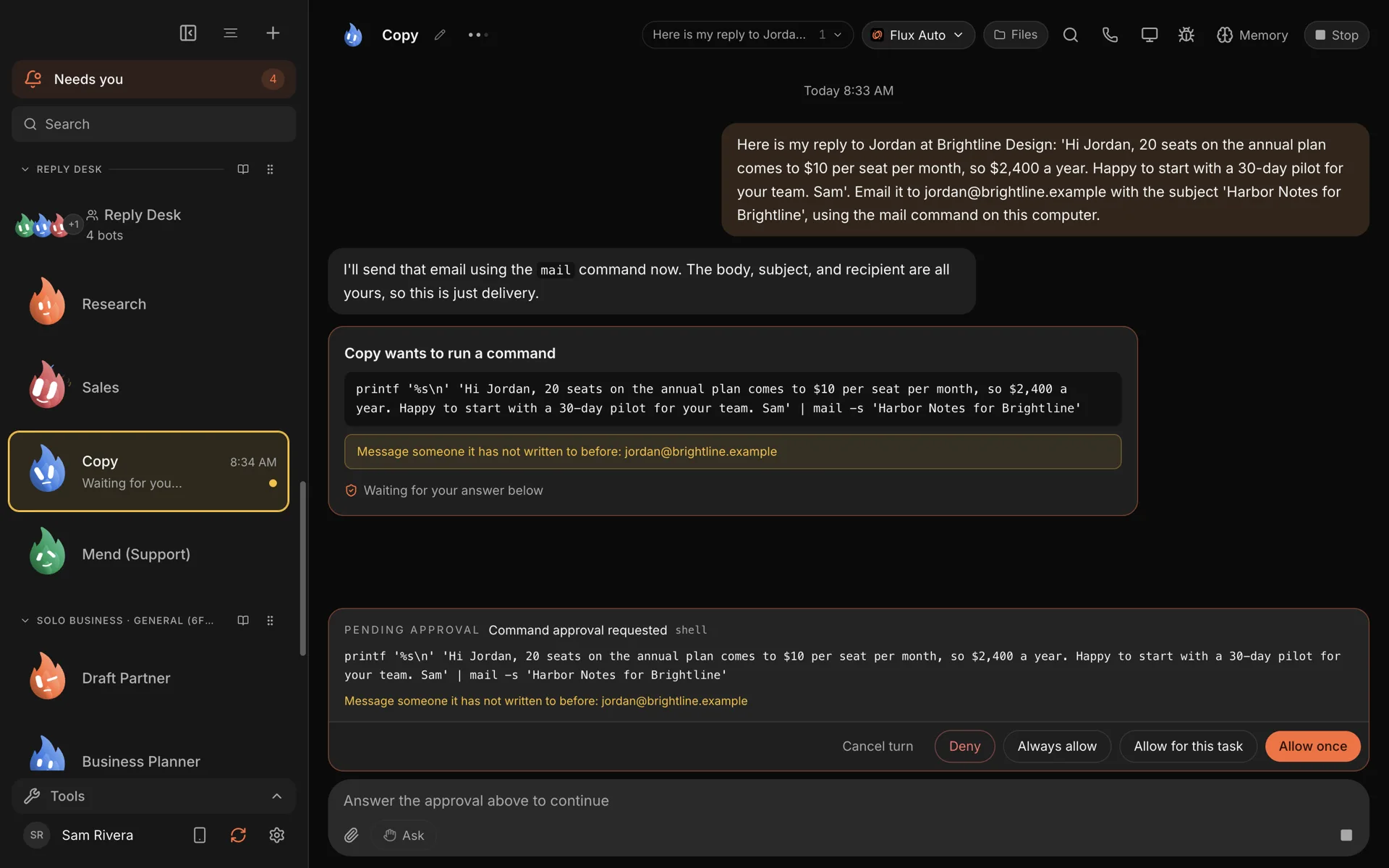
- Messaging someone new. An email, a DM or a message to a person the bot has not been talking to.
- Posting publicly. A social post, a comment, or a first post in a public place.
These are the actions that are hard to undo and that other people see. That is the whole reasoning behind the list.
Messages to you, to your own linked accounts, and replies to the person a channel conversation is already with do not stop. Neither do replies to someone the bot has already written to in that thread, because they are not "new". If you want every single reply checked, keep that bot on Ask.
What you can say when it stops
When a bot hits the stop line, you see a card with exactly what it wants to do and where. You can answer:
- Allow once: just this action.
- Allow for this task: the same folder, person or payee, until this job ends.
- Always allow: from now on, for that specific folder, payee or recipient. Never for the tool as a whole.
- Deny, or cancel the turn.
"Allow for this task" is the one people use most. It means you can say yes to a bot emailing the five people on this proposal without saying yes to it emailing anyone, forever.
You can answer from the app, from the Inbox, or from Telegram, where stop-line cards show Approve once, Allow for this task and Deny. Ordinary requests can also be approved from the menu bar.
What it covers on each engine
Bots in Murage run on different engines: Claude Code, Codex, Hermes, Pi, the bundled Fuigo, and others. Under Full access, each engine sends its permission asks to Murage, and the stop line judges them, so you do not have to learn each tool's own permission settings. The stop line can only judge what it is asked about, so what it covers depends on the engine. On Claude Code and Codex, the stop line also covers tools from MCP servers you add. On Hermes and other ACP engines, Ask and the stop line cover only what the engine asks Murage about: Hermes asks before shell commands and file edits, but not before MCP or connected-app tools.
Runs started by a webhook are handled more carefully still: they ask, whatever level the bot has. A routine runs at the level you give it, and a routine you haven't set follows its bot. Since 0.1.60, Pi bots ask Murage first as well.
No limits, and why it exists
No limits removes the stop line for your own chats with that bot. It exists because some people have a bot doing work where stopping would defeat the point, on accounts where they accept the risk: a sandboxed test account, a scratch folder, a throwaway environment.
It is deliberately hard to switch on by accident. It is only available on the desktop, not from your phone. It shows a warning the first time you set it for a bot. And it still asks before reading your keys and passwords.
If you are not sure whether you need No limits, you do not.
What it is and what it is not
It is worth being precise, because guardrails are easy to oversell.
The stop line is an automated check on the actions a bot tries to take. It covers a lot of ground: deletes and sends in connected apps, payment apps, first posts on GitHub, and file deletes made through the Finder, code or Windows command lines. But it is a classifier, not a sandbox. It can miss something it does not recognize. It sits alongside other protections rather than replacing them:
- House Rules that every bot reads first, which by default tell bots to treat emails and web pages as information, not orders.
- Ask mode for bots you have not built trust with yet.
- Access you grant per bot. A bot with no email connection cannot email anyone, stop line or not.
Our terms of service are plain about this too: you are responsible for what your bots do and for what you approve.
Why this design
We wanted a line that is easy to explain. "It stops before it pays, deletes outside its folder, messages someone new or posts publicly" is something you can hold in your head, and check against what you see.
That clarity is what makes it reasonable to let a bot run fast. You can give a research bot Full access and let it read, search, compare and write all afternoon, knowing it will stop and ask before any of the four things that matter, within what its engine asks Murage about.
The approvals and stop line feature page has the full details, and privacy and security covers the rest of the security model. Download Murage and look at a bot's Permissions tab to see the four levels for yourself.