"AI Chief of Staff" is one of those phrases that can mean almost anything. Some products use it for a chatbot with a calendar plug-in. Others use it for a scheduling assistant. In Murage it means something specific, and it is worth spelling out, because it changes how you work with AI.
In a company, a chief of staff does not do every job. They take a messy request from the boss, work out who should handle each part, brief those people properly, chase the work, and come back with one clear answer. The boss deals with one person instead of ten.
That is the job Murage's Chief of Staff does, with bots instead of people.
One conversation instead of ten
When you install Murage, the first bot you meet is your Chief of Staff. It is called Ember unless you rename it. You can talk to any bot directly if you want to, but you do not have to. The Chief is the front door.
You give it outcomes, not prompts. Compare two ways of asking for the same thing:
- A prompt: "Write a list of competitors in dental practice software with their pricing."
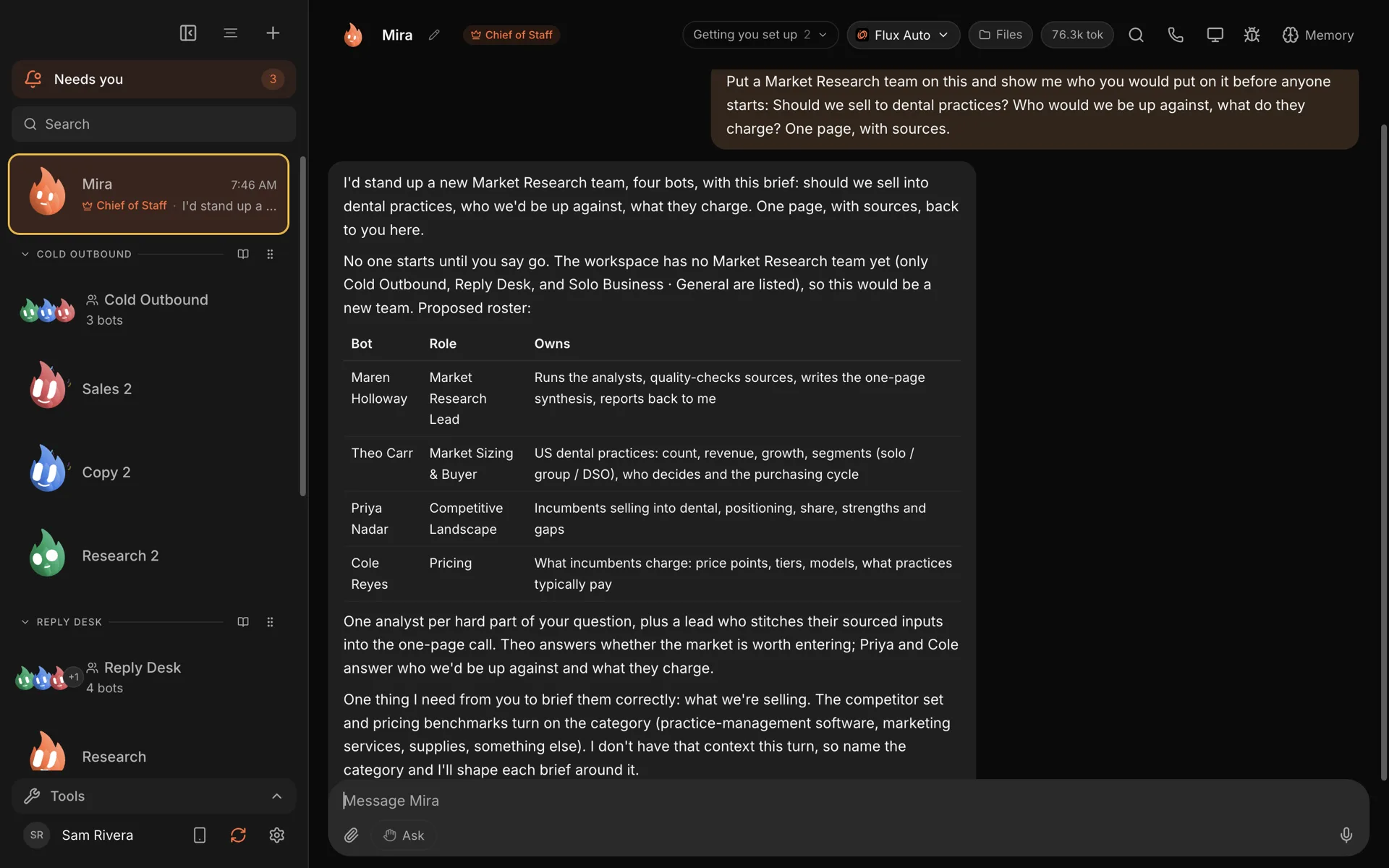
- An outcome: "Should we sell to dental practices? Who would we be up against, and what do they charge? One page, with sources."
A single chatbot will have a go at either. The second one is really three or four jobs: size the market, map the competition, find the prices, then pull it together into a recommendation. That is where a Chief of Staff earns its place.
What happens when you ask
Here is roughly what the Chief does with a request like that.
It works out the shape of the job. Small, one-step jobs it just does itself. Bigger ones it breaks into parts.
It proposes a team, and waits. For the dental question, it might suggest a small research team: a lead who writes the final page, one bot to size the market, one to map the competitors, and one on pricing. It tells you who it would put on the job and why before anyone starts, and asks for anything it is missing. In the example above, it asked what exactly we were selling, because the competitor set depends on it.
It creates the bots and briefs them. Each specialist gets a name, a role and instructions for its part. New bots start with no connected apps, no browser and no access to your computer. They get what you give them, when you give it.
It hands out the work. Bots work in parallel and can ask each other questions. If you would rather approve any contact between bots, there is a setting for that.
It reports back in one place. The results come back into the Chief's thread. You read one answer, not four transcripts. If you want to see the detail, each bot's work is still there.
You can see the whole structure on the team map: the Chief at the top, team leads under it, and specialists under them.
It remembers who you are
A good chief of staff does not need the background explained every Monday. Murage's Chief keeps memory: what you have told it about yourself and your business, how you like things done, and what happened last time. So "do the Monday numbers the way we did them last week" is a reasonable thing to say.
That memory is stored on your computer, and you can open it, correct it or make it forget things. We cover how it works in five levels of memory, in plain words.
It asks before it acts
Delegating to software only works if you can trust where it stops. Every new bot in Murage starts in Ask mode: before it does something that matters, such as sending a message, it stops and asks you. That includes the bots your Chief creates. On Hermes and other ACP engines, Ask and the stop line cover only what the engine asks Murage about: shell commands and file edits.
The questions from every bot land in one inbox, so the Chief can keep a team of specialists busy without you watching a dozen chats. When you trust a bot with a kind of work, you can give that bot more room, and take it back just as easily.
It works on the AI you already have
Each bot, including the Chief, runs on an engine you pick. That can be a Claude Code or Codex sign-in you already pay for, a provider API key, a local model, or Flux Router. You can mix them: a research bot on one model, a writing bot on another, a cheap sorting bot on a local model. More on that in how Murage sits above Claude Code, Codex and Hermes.
One practical note: the Chief needs an engine that can use tools and hand work to other bots. The bundled Fuigo engine, Claude Code, Codex and most other tool-using engines can. A plain chat-only endpoint cannot.
What it will not do
It is worth being honest about the limits.
- It does not run while your computer is off. Murage is a desktop app. The team works while Murage is open.
- It does not replace your judgment. It proposes, drafts, researches and organizes. You decide.
- It is only as good as the engine behind it. A stronger model makes a better Chief. A weak one will make a mess of a big job.
- It will not give its bots access you did not grant. If a job needs Gmail, you connect Gmail and give it to the bots that need it.
Good first jobs to try
If you are not sure where to start, these tend to work well on day one:
- A morning brief: what is on today, what came in overnight, and the one thing to do first.
- A research question you have been meaning to look into, answered in one page with sources.
- A weekly report from the notes and numbers you already have.
- A pile of notes from a meeting or a week, turned into a list of what you promised people.
The Chief of Staff feature page has the full detail, and if you want the longer version of the idea, see AI Chief of Staff. Or just download Murage and ask it for something you have been putting off.