"It remembers" is one of the most overused claims in AI. Sometimes it means the chat history is saved. Sometimes it means a hidden profile you cannot see. Sometimes it means nothing at all.
Murage's memory is specific, it lives on your computer, and you can open every piece of it. The easiest way to understand it is as five levels, from the narrowest to the widest.
1. This conversation
The first level is the one everyone expects: what was said in this chat. A bot knows what you told it five messages ago, and the conversation is saved so you can scroll back.
On its own, this is not much. It is what every chat app does. The other four levels are what make a team feel like it knows you.
2. Each bot's own notebook
Every bot keeps its own notes, in a notebook file that belongs to that bot. It is a plain file, and the bot reads it at the start of every turn and updates it as it works.
This is where a bot keeps the practical details of its job: how you like the weekly report laid out, which clients get the formal tone, the name of the spreadsheet it pulls numbers from. You can open the notebook and read it or edit it like any other file.
Alongside the notebook, Murage keeps managed memories scoped to that bot: facts it has picked up from your conversations with it, each stored with where it came from.
3. Team and project memory
When bots work together, some things need to be shared. A team, a channel or a project can hold memory that all of its members can recall. If the research bot learns that a competitor changed its pricing, the writing bot on the same project can use that without being told again.
A project also has a written goal. That goal becomes the instructions every bot in the project follows, so the whole team pulls in the same direction.
4. Workspace memory: you and your business
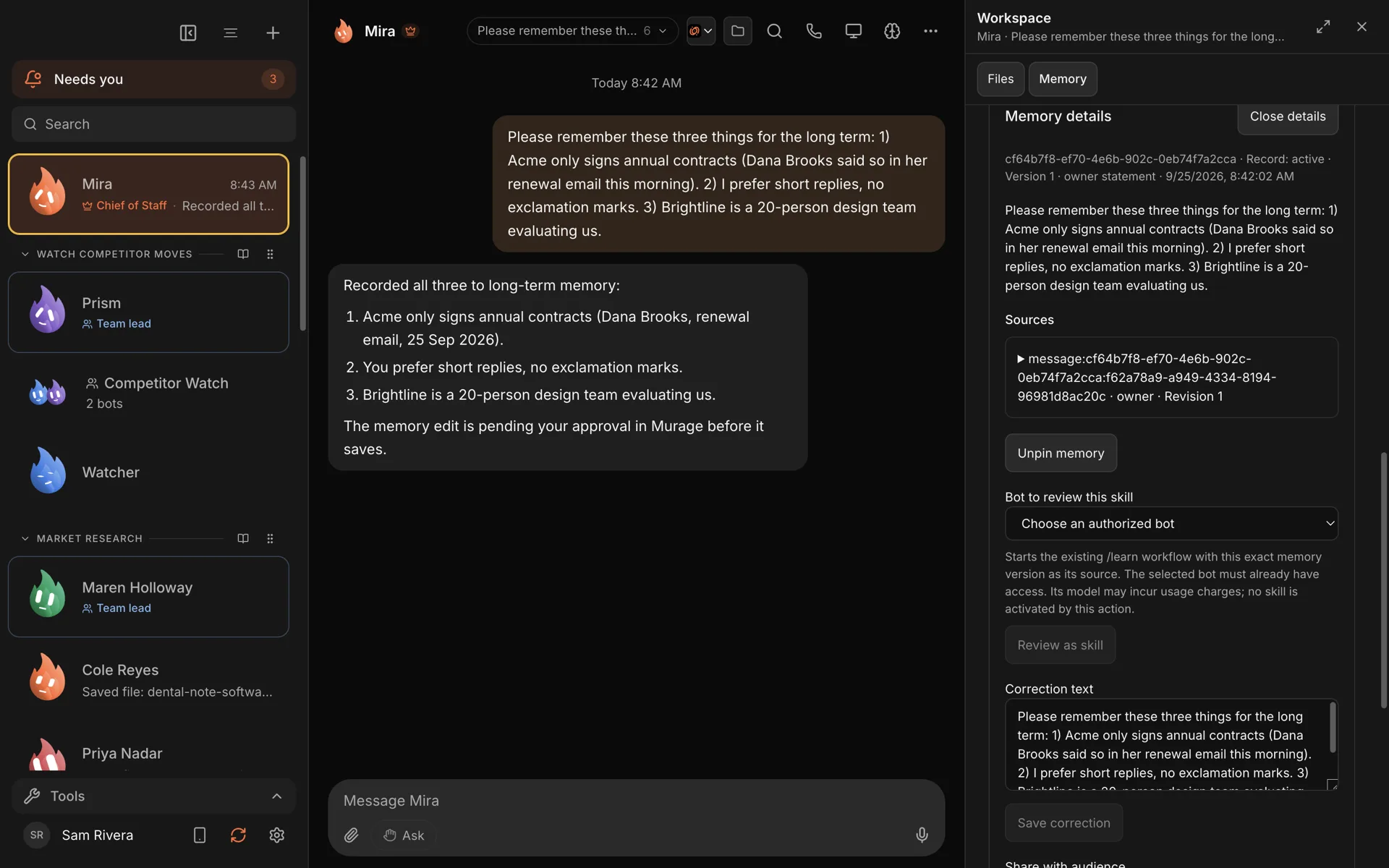
The widest shared level is your workspace. This is what every bot can draw on: who you are, what your business does, your preferences, and the standing facts that apply everywhere. "We only sign annual contracts." "I prefer short replies, no exclamation marks." "Brightline is a 20-person design team evaluating us."
You can import notes you already have to fill this in. Imported notes are marked as unverified until you check them, so a bot knows the difference between something you confirmed and something it read in an old file.
5. Learned skills: how to do things
The last level is not about facts. It is about ways of working.
A skill is a written procedure a bot can follow. /learn is experimental, so you switch it on first in Settings → Experimental → Teach a skill. After that, when a job goes well, you can type /learn and the bot writes down how it did it as a skill. The new skill arrives switched off, and it only starts working once you read it and press Enable. You can also turn on automatic learning of facts and procedures, which needs you to choose which AI connection does the extracting.
Nothing here changes a bot behind your back. Bots remember and suggest. You decide what becomes a skill.
How memory gets made
Out of the box, a new install captures and recalls memory. As you work, Murage records durable facts from your conversations, with the source excerpt kept, and recalls the relevant ones in later turns for the right bot, team or project.
You can also just ask. "Please remember these three things for the long term" works, and the bot will show you what it recorded.
You can open all of it
This is the part we care most about. Every memory can be:
- searched, across the whole workspace
- inspected, with its text, its version and the source it came from
- corrected, when a bot got a detail wrong
- pinned, so it always comes back
- shared to a wider level, or archived
- forgotten, when it should not be there at all
Open Manage memory in the app to do any of this. If a bot keeps getting something wrong, the fix is usually to find the memory it is relying on and correct it.
Where it lives
All of this is stored on your computer, in Murage's own data folder, in a local database with a search index that can be rebuilt. It is not in a Murage cloud, and it is included in your backups.
There are a few limits worth knowing:
- Semantic search downloads a small local model. On Intel Macs, memory search is keyword-only.
- No sync between computers. Restore a backup to move to a new machine.
- Hosted engines see what they are given. When a bot uses a hosted AI provider, the memories recalled for that turn are sent along with the message. Forgetting a memory later cannot pull back what was already sent.
- People you talk to through a channel are not the owner. If someone other than you messages your bot through a connected channel, they do not get your bot or team memory.
Why five levels and not one
A single pile of "memories" gets messy fast. The research bot does not need your personal preferences about email tone. Your personal assistant bot does not need the details of a client project it is not on. Levels keep memory relevant: each bot recalls what belongs to it, its team and its project, plus what applies to your whole workspace.
It also makes memory easier to trust. When you can see which level a memory lives at, you can tell why a bot knew something, and change it if it should not.
Try it
After you download Murage, tell your Chief of Staff three things about your business you would otherwise repeat every week. Then open Memory and look at what it recorded. That is the whole idea: bots that remember, and memory you can read.
The memory feature page has the details, and /learn and skills covers level five.