A launch is a good test for any kind of help, human or AI. It has a fixed date, a lot of moving parts, and a dozen small pieces of writing that all need to say the same thing. It is also exactly the kind of work that piles up on a small team, because nobody has time to do the positioning properly before the copy is due.
Here is how to run one in Murage, using a project and a ready-made launch team.
Why a project, not just a chat
You could ask your Chief of Staff for a launch plan in a normal chat, and it would do a reasonable job. A project is better for anything that lasts more than a day, for three reasons.
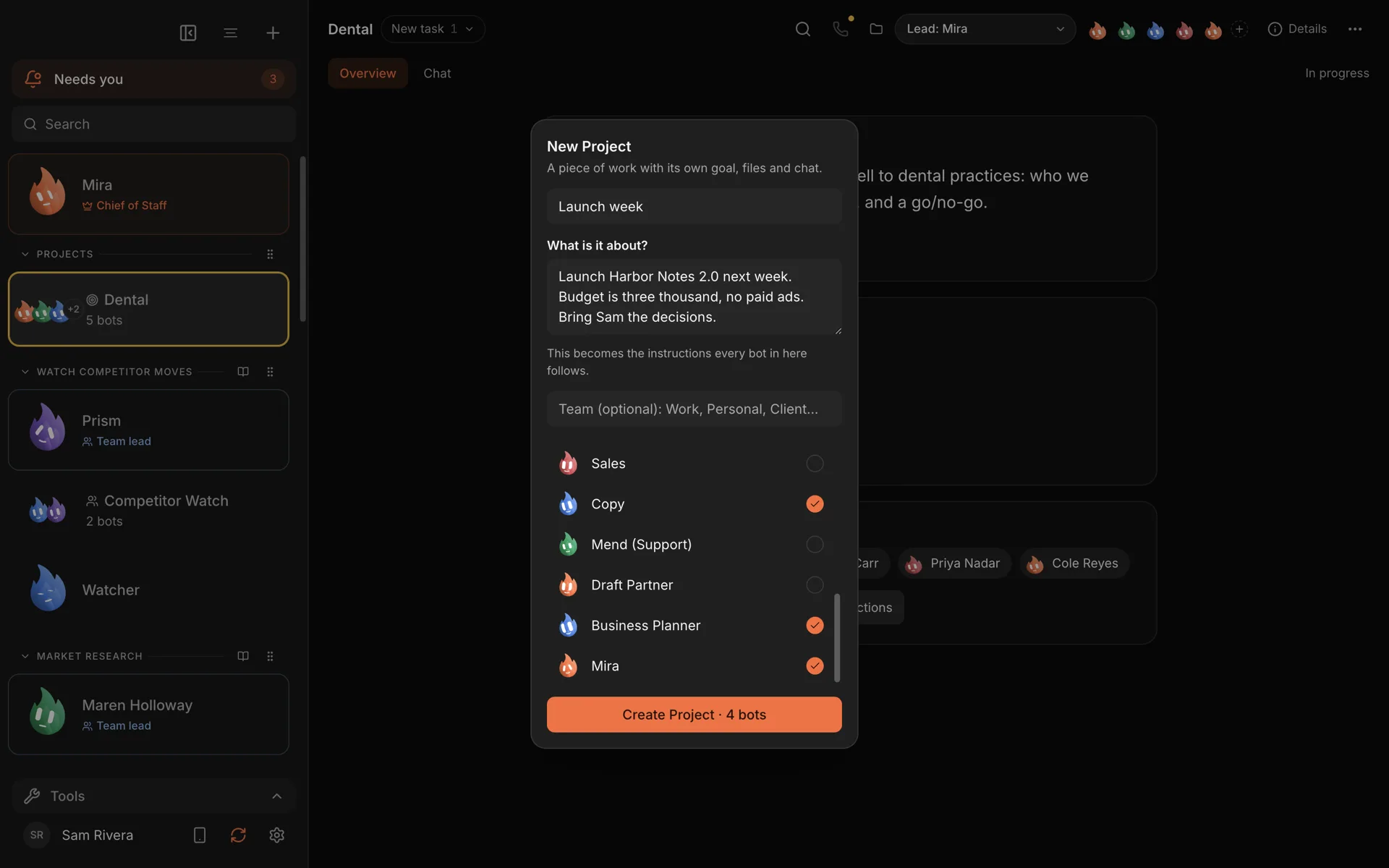
It has a written goal. When you create a project, you write what it is about in plain words. That goal becomes the instructions every bot in the project follows. You do not have to repeat the budget or the date to each bot.
It has its own space. A project has its own files and its own chat, so the launch page draft, the email sequence and the channel plan live in one place instead of scattered across conversations.
It shares memory. Bots on the project recall what the project knows. When research finds out who the launch is really for, the copywriter can use it without being told.
Each project has a home tab showing its goal, status, timing and members, and it is listed under Projects in the sidebar.
Step 1: create the project
From the + menu, choose New Project. Give it a name and say what it is about. For example:
Launch Harbor Notes 2.0 next week. Budget is three thousand, no paid ads. Bring Sam the decisions.
Add the bots you want on it. You can pick existing bots, and choose a lead to coordinate. If you already have a channel where the launch has been discussed, you can turn it into a project with "Make it a project" instead.
Step 2: bring in a launch team
If you do not have launch bots yet, the team library has a Product Launch team built for this. It has five bots:
- Research checks who the launch is really for and why they would buy now.
- Brand sets the positioning and keeps every piece on message.
- Copy drafts the launch page, emails and posts.
- Channels picks where to say it and builds the schedule.
- Sales prepares the follow-up for everyone who shows interest.
For a course, book or other info product, there is an Info-Product Launch team that adds a bot for structuring the product itself. Both work on what you give them and need no connected apps to start.
Step 3: brief the launch
Give the project a proper brief. The more concrete, the better:
We launch the new reporting feature on the 14th. Build the launch plan: who it's for, the message, the channels and a day-by-day schedule. Draft the page, the email and five posts. Publish nothing.
Add anything the team should learn from: notes from a past launch, customer interviews, the feature spec, your pricing. Drop the files into the project and every bot can read them.
Step 4: message first, then everything else
The order matters. A good launch team agrees the positioning before anyone writes copy, so the page, the emails and the posts all say the same thing. Ask for the positioning first, read it, push back, and only then let Copy and Channels loose.
When the drafts come in, they land in the project: launch page, email sequence, posts and a day-by-day plan. Edit them there, or ask for changes in the project chat.
Step 5: run the week
During launch week, a couple of routines help:
- A daily check-in each morning: what is scheduled today, what went out yesterday, and what needs a decision.
- A follow-up pass each afternoon: draft replies to everyone who responded.
Set them up by asking your Chief of Staff. Nothing is scheduled until you press Confirm, and you can pause them once the week is over.
When the launch is done, mark the project Finished. Its files, chat and memory stay, so the next launch can start from what this one learned.
What stays with you
A launch is public, so this is where approvals earn their keep. New bots start in Ask mode, and publishing a post or sending an email is a request you approve, not something that just happens. The team can remind you on the day and draft last-minute changes while Murage is open. Pressing go is yours.
The honest limits
- A project has a goal and a status, not a task board. Status is In progress, On hold or Finished. There are no tasks, milestones or due dates. For a checklist, keep a file in the project and ask the team to update it.
- Routines need your computer on. Check-ins run while Murage is open.
- Posting and sending through apps needs connections. If you want the team to post or email for you once you approve, connect those apps through Flux Router or your own connected-apps key.
Try it
The launch plan use case shows the whole job end to end, and the projects feature page covers how projects work. If your launch is still an idea, market validation is a good project to run first.
Download Murage, start a project, and let the team draft the launch while you decide what it should say.