










MURAGE
How it worksFeaturesSolutionsUse casesComparePricingDocs
DownloadDownload
MURAGE

An AI Chief of Staff and a team that does the work. Free and open source, from Ferrox Labs.

Product

  • Features
  • How it works
  • Engines and apps
  • Privacy and security
  • Pricing
  • Murage Cloud
  • Download
  • Changelog
  • FAQ

Solutions

  • Solopreneurs
  • Founders and startups
  • Agencies
  • Ecommerce
  • Small business
  • Creators and educators
  • Developers
  • SaaS
  • Nonprofits
  • Consultants and freelancers
  • Customer success teams
  • Legal and professional services
  • Small teams
  • Sales teams
  • Operations managers
  • Industries
  • Use cases
  • Build your team

Compare

  • vs Claude Code
  • vs Codex (ChatGPT Work)
  • vs Claude (Cowork)
  • vs Paperclip
  • vs OpenClaw
  • vs Hermes Agent
  • vs Manus
  • vs Genspark
  • vs n8n
  • vs Zapier
  • vs Grok Bot
  • vs Viktor
  • vs Lindy
  • vs Tasklet

Resources

  • Docs
  • Team library
  • Skill library
  • AI Chief of Staff
  • How we test
  • Limits
  • Switching to Murage
  • Open source
  • Blog
  • Release notes

Company

  • About
  • Partners
  • Enterprise
  • Contact
  • Privacy
  • Terms
  • Cookies
© 2026 Ferrox Labs. Murage is open source under AGPL-3.0.
Features · Faces, voices and personalities

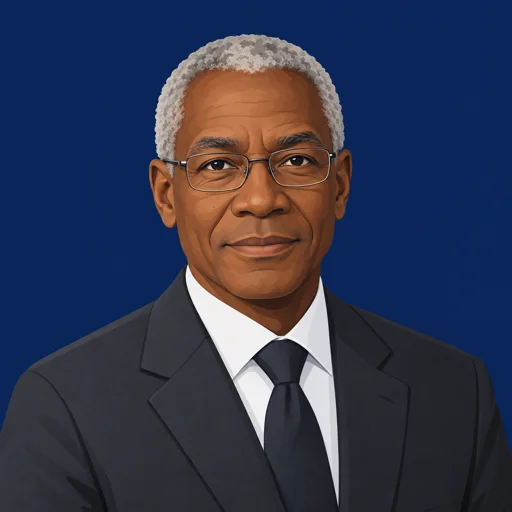
Every bot has a name, a face, a voice and a personality.

Your team feels like a team. Give each bot a portrait from one line of description, a voice for calls, and a personality that changes how it talks. Change any of it whenever you like.

Download Murage

Faces, voices and personalities

  • Generate a portrait from one line, like “Coin, accounting, focused, authoritative”, or upload your own image
  • Or keep the flame character and pick its color, expression and body shape
  • A Personality field that changes how the bot talks: dry, warm, blunt, careful
  • Its own voice for calls and spoken replies
  • Group bots into teams and make one the team lead
  • Rename anyone, restyle anyone, add as many bots and teams as you need

Doing it yourself

  • On your own

    A folder of prompts and a note of which one does what.

  • A chatbot alone

    One assistant with one voice, whatever the job.

  • With Murage

    A named team you can tell apart at a glance, each with its own face, voice and way of talking.

An example team.

Every portrait here came from Murage’s own avatar generator and a one-line description. They’re bots, not customers.

Ember

Ember

Chief of Staff

Runs your teams: hands out the work, chases it and brings the results back to you.

  • Founder Setup · 4 bots

    • PatchPatch (Ops)Team leadSteady, organized, allergic to loose ends
    • MiraMira (Brand)Sharp, opinionated about what makes you different
    • CoinCoin (Numbers)Focused, authoritative, shows the work
    • SentrySentry (Counsel)Calm and careful; says when you need a real lawyer
  • Growth · 5 bots

    • BeaconBeacon (Channels)Team leadUpbeat, plans the week and sticks to it
    • ScoutScout (Research)Curious; marks what it couldn’t confirm
    • QuillQuill (Copy)Works from your examples and tone notes
    • LensLens (Analyst)Precise, says what changed and why it matters
    • VerdictVerdict (Quality Gate)Direct and exacting; flags gaps for review
  • Customer Desk · 2 bots

    • MendMend (Support)Team leadPatient and kind, never promises what you have not approved
    • RioRio (Sales)Warm and persistent, follows up without being pushy

See it in the app.

A real screenshot from a demo workspace.

Demo workspace. Your Chief of Staff starts as Ember; you can rename it.

How it works.

  1. Step 1Open the bot’s settingsEvery bot has an Overview with its name, title, avatar and personality.
  2. Step 2Describe its lookType a line of direction and choose Generate avatar. Murage draws a square portrait that crops cleanly to a circle.
  3. Step 3Give it a personalityA short line in Personality, such as “direct, a little dry”, shapes every reply it writes.
  4. Step 4Pick a voiceChoose the voice it uses on calls and when it reads replies aloud.

Good to know.

  • Generated portraits use Flux Router, or your own OpenAI key if Flux is not set up; each one uses a little credit
  • Portraits are illustrated characters. The generator will not make a photo of a real, identifiable person
  • Voice uses Flux Router credits or your own keys (OpenAI, xAI, Groq, OpenRouter or ElevenLabs). Mac and Windows also have free built-in system voices. A Claude or ChatGPT subscription doesn’t cover voice.
  • The look is only the look. How a bot behaves comes from its personality, instructions, skills and House Rules

Put it to work.

Start hereRecorded run

Inbox triage

Open your inbox to drafts, not a pile.

See how it runs

“Go through my inbox before I get in. Draft replies in my voice. Send nothing.”

Inbox, 7:40 AM

  • 12 new since last night
  • 4 receipts set aside
  • 8 replies drafted in your voice
  • 2 need a fact from you before they can go

Needs your answer

Two drafts need facts from you: the prior contract terms and the per-seat price.

Reply to your Chief of Staff

Questions.

Can I give my AI agents faces?+

Yes. In a bot’s settings, describe how it should look in one line and choose Generate avatar, or upload an image. The default is Murage’s flame character, which you can recolor and restyle.

Does a personality change how the bot answers?+

Yes. The Personality field is sent to the bot with every turn, so it changes tone and style. The avatar description only changes the picture.

Can I have more than one team?+

Yes. Make as many teams as you like, each with its own lead. Your Chief of Staff hands work to the right team.

Are the faces on this site real customers?+

No. They are example bots made with Murage’s own avatar generator, so you can see what a team looks like.

Works well with.

  • Chief of StaffTell your Chief of Staff what you need. It builds the team.
  • Teams and team leadsOrganize your bots into teams, each with a lead.
  • Voice callsPick up and talk to your team. Out loud.
  • Image generationAsk for an image. Approve it. Get it in the chat.
  • Team library68 ready-made teams. Say what you need, get the right one.
  • House RulesWrite the rules once. Every bot reads them first.

Meet your team.

Download the free app, connect the AI you already pay for, and tell your Chief of Staff what needs doing. Plan on about ten minutes from install to a working team.

Free · Download Murage

No account needed · Runs on the AI plan you already pay for