"Brief me every morning" is the first thing a lot of people ask an AI assistant to do. It is also one of the easiest things to get wrong. A brief that lists every email and every meeting is just your inbox and calendar, reformatted. You read it once, then stop.
A useful brief does the opposite. It leaves most things out. Here is how to set one up in Murage that you will still be reading in a month.
What a good brief looks like
The version that works for most people fits on one page and has three parts:
- Today: what is fixed. Meetings, deadlines, anything with a time on it.
- Overnight: what changed. Replies waiting on you, anything that moved while you slept.
- Do first: one thing. Not five. The thing that will cause the most trouble if it slips.
That last part is where the value is. Anyone can list your meetings. Picking the one thing is the job of a chief of staff.
Step 1: tell your Chief of Staff what you want
In Murage, the morning brief is one of the five starter jobs the welcome offers ("Brief me every morning: what is fixed, what is owed, what will slip"). You can pick it there, or just ask your Chief of Staff at any time:
Every weekday at 7, send me one page: what is on today, what came in overnight, and the one thing to do first.
Be specific about what to leave out. "Ignore newsletters and receipts." "Only mention a meeting if I need to prepare for it." "Don't tell me about anything I can't act on today." The brief gets better the more you tell it what not to say.
Step 2: connect what it should read
A brief is only as good as what it can see. The most useful sources are your calendar and your email, which connect as connected apps through Flux Router or your own connected-apps key. The welcome shows you which connections the job needs before you start.
If you do not want to connect anything yet, it still works from what you tell it. Paste in the week's priorities on a Monday and the brief will work from those. You can connect your calendar later and it will read that too.
You can also point it at files you want watched, like a project folder or a list of deals. A watch re-checks them on a schedule and only reports when something changed, which keeps the brief short. For a web page, such as a competitor's pricing, use a daily routine that checks the page and compares it with the last check.
Step 3: confirm the routine
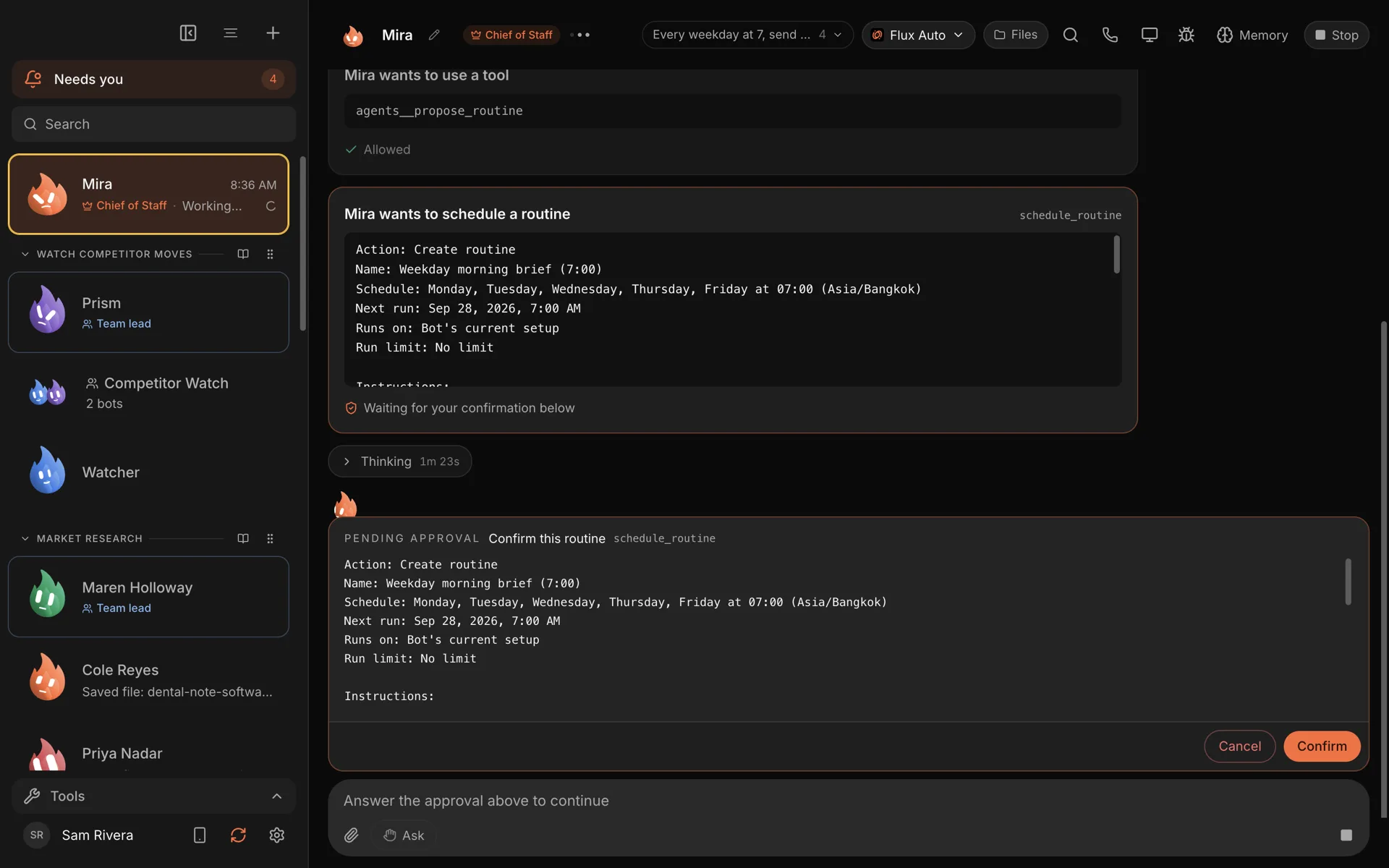
Your Chief of Staff turns the request into a routine and shows you the details before anything is scheduled: the name, the days, the time and your time zone, and the instructions it will follow. Nothing runs until you press Confirm.
After that, the routine is visible in the Routines page, where you can pause it, change it or run it now. Each run leaves a receipt: completed, failed or missed, with the result.
Step 4: get it where you are
The brief lands in your Chief of Staff's thread in Murage, with a count in the menu bar. Away from your desk? Message your Chief from Telegram ("what's in today's brief?") and it replies there; approvals come to you with a tap.
That is the real advantage of a brief from a team rather than a summary tool: you can answer it. "Draft a reply to Dana." "Move the Acme proposal to this afternoon and block an hour." "Ask the research bot to look into that." The Chief hands the work to the right bot, and anything that needs your OK comes back to you as a request.
A team for a sharper brief
If you want the brief to do more than list things, there is a Daily Briefing team in the team library. It looks at your concerns from four angles (operations, money, sales and risk) and uses them to pick the most important next step. It works on what you give it and needs no apps to start.
The honest limits
- Your computer needs to be on. The routine runs while Murage is open. If your laptop was asleep at 7, the brief runs when Murage is next open, as long as that is within 12 hours, and after that it is marked missed. Murage Cloud, when it opens, is for people who need it on time every time.
- Connected apps need Flux Router or your own connected-apps key. The app is free. The connections are not always.
- You set how careful it is. Each routine has its own approval level. Keep the brief on Ask or Auto, and if it wants to do something that needs permission, it asks and tells you straight away.
Make it yours over a week
The first brief will be too long. Say so. "Half as long. Drop the weather. Only one thing in Do first." Tell it which items were useful and which were noise. It keeps notes, and by the end of the first week the brief should read like it came from someone who knows your business.
If you want to go further, pair it with meeting prep, so each meeting on today's list comes with a short note, or a Monday weekly report.
The morning brief use case and the routines feature page have the full details. Download Murage and ask for tomorrow's brief tonight.